
Tito price and terms
Terms
- Free plan
- YesYesAccounts are free to create with no card required, and events whose tickets are all free carry no Tito fee at all
The terms in full
paid tickets cost 3% each.
- Sign up without sales
- YesYes
For AI agents
- API
- Yes
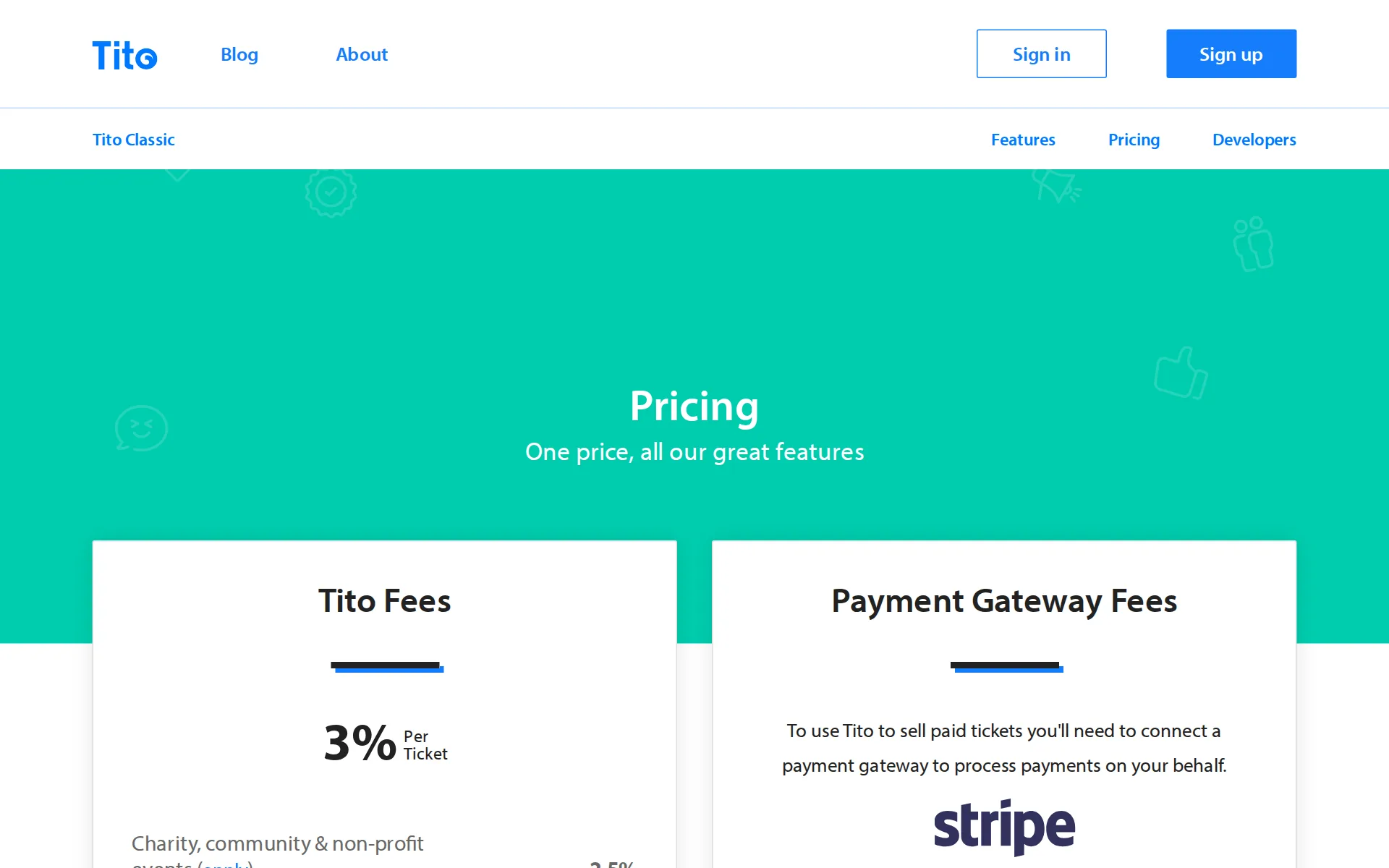
Pricing page, captured
Its own pages, checked
What we checked on Tito
The fee per ticket
One flat rate of 3% of the ticket price per paid ticket, capped at EUR 25 per ticket, with no subscription or setup fee on top.
3% Per Ticket
ti.to/pricingChecked
Who pays the fees
The organizer absorbs the Tito fee: the platform deliberately blocks passing booking fees to buyers and suggests building them into the ticket price instead.
By design Tito doesn't allow for passing booking fees on to customers.
Card processing
Card processing sits outside the Tito fee: the organizer connects Stripe or PayPal, and Tito publishes Stripe rates of 1.4% + EUR 0.25 on European cards, 2.9% + EUR 0.25 on non-European cards.
European cards 1.4% + €0.25 (about $0.28) · Non-European cards 2.9% + €0.25 (about $0.28)
ti.to/pricingChecked
All-in price at checkout
Because fees cannot be passed to buyers, the price shown on the ticket is the price charged, which Tito frames as a transparency choice.
The price the attendee sees is the price they pay, with no sudden surprises.
Free events
Free tickets carry no Tito fee at all, and the vendor states you only pay while selling paid tickets.
And if all your tickets are free, Tito is completely free to use.
Fees on refunds
Both the Tito fee and the card processor fee are charged at the transaction and are not returned when the organizer refunds, though refunding itself costs nothing extra.
Tito and payment gateway (Stripe or PayPal) fees are charged at the time of transaction and not reversed if you subsequently refund an order.
Nonprofit rates
Registered non-profits, charities and at-cost community events get 2.5% instead of 3%, by application through a form before selling starts.
we offer a discounted Tito fee of 2.5%, down from our standard 3%
Plans and subscriptions
There is no monthly or annual plan to change the fee: one per-ticket rate covers every feature, including premium ones and branding removal.
There’s no setup fee, no monthly subscription, and no extra fee to use premium features. You only pay a fee on tickets sold.
ti.to/pricingChecked
Donations and tips
A ticket can be set as a donation or pay-what-you-like with suggested and minimum amounts, and a donation-only ticket type can be sold alongside paid tickets; no platform tip prompt is documented.
If you'd like to give customers the option to add a donation to their order, or pay-what-they-like, you can select the Donation setting under Pricing…
Sales tax on tickets
adds a tax line: the organizer defines tax types with a name and percentage and applies them per ticket, and Tito states the organizer is responsible for remitting.
If tax is applicable on tickets for your event, you are responsible as the event organiser for charging tax and paying it to the relevant authorities.
When you get the money
Money lands in the organizer's own card processor account as tickets sell; Tito never holds funds, and Stripe pays out on a rolling cycle rather than after the event.
Your funds are sent directly to your bank account by your chosen payment gateway and this means Tito can never hold or delay your money.
ti.to/pricingChecked
Your buyers’ details
Tito holds attendee data only as processor for the organizer, does not sell or claim it, and attendee and order data is exportable and emailable from Messages.
we are not doing anything with your data: we don’t share it, we don’t sell it, and we don’t try to claim it as our own
Ticket types and discounts
Multiple ticket types with scheduled on-sale dates, flat or percentage discount codes, reducing pricing and minimum-ticket group codes are all supported.
Use our Discount Codes feature and set a number in the Minimum tickets field.
Reserved seating
There is no seating chart: seat references can only be written onto tickets as metadata, by hand or through the API, so buyers never pick a seat.
While Tito doesn't have seating allocation functionality, you can display seat numbers by including them as metadata.
Questions at checkout
Custom questions in text, textarea, checkbox, select and country formats attach to tickets and are answered at the assign stage of checkout.
To add custom questions to tickets, you can use our Questions & Answers feature available in the sidebar.
Registration forms and waivers
Custom question fields build the registration form, and a required terms checkbox is standard, but the full pre-checkout Terms & Conditions step must be switched on by Tito support.
This feature is not enabled by default so please contact us for access.
Timed entry
Activities add dates, times and venues to parts of an event with an optional capacity each, but attendee-selectable options such as workshops are flagged beta.
Specifying options like workshops that attendees can select from ( beta )
Waitlist
A per-ticket waiting list appears once that ticket sells out, collects name and email, and lets the organizer offer returned stock to people on it.
Waiting lists allow your customers to join a list tied specifically to a particular ticket after the ticket sells out.
Online events
Tito sells the tickets and documents delivering a Zoom or other stream link via custom messages, but hosts no streaming itself and the link handling is the organizer's setup.
Add the Zoom link and information to join your meeting as a custom message.
Sell on your own website
Two lines of script embed the ticket list as styleable HTML and buyers complete payment in an overlay without leaving the organizer's page.
So long as there is an SSL certificate, customers can then complete the purchase via an overlay without leaving the page.
ti.to/developersChecked
Website builders
embed only: the widget works on WordPress, Squarespace and Weebly through pasted script code, and on WordPress needs a third-party plugin just to inject JavaScript.
Before adding the Tito widget, you'll need to install a plugin that allows you to add custom JavaScript to the header.
Add-ons
Extras are sold as additional ticket types and bundled packages, but the bundling feature Supercombos is a beta the organizer must request access to.
Supercombos is a beta feature. Contact us to request access.
Recurring events
No recurring-series builder; instead an event is duplicated with its settings, ticket types, activities and questions copied, then renamed for each occurrence.
When you duplicate an existing event, all your settings, ticket types, activities and custom questions are copied across, but not any of your orders…
Refunds and transfers by buyers
Attendees can reassign a ticket and cancel a free one from the ticket link only if the organizer allows it, and paid refunds must be requested from the organizer directly.
To request a refund for a ticket, you will need to contact the event organiser.
Check-in app
Native iOS and Android check-in apps plus a web app scan the ticket QR code or search by name, at no extra charge; the site does not say whether scanning works offline.
Scan QR codes or search by name · Native apps for iOS and Android · Or use our web-app on any device
ti.to/features/check-inChecked
Door sales
No door sales. Tito has no card reader or cash sales at the door.
If you add an attendee manually, they will not be able to pay you via Tito. You'll need to invoice them separately.
Apple Wallet
An Apple Wallet pass with basic event details is generated for every ticket issued, and the organizer can disable it per ticket type.
Tito generates a Wallet ticket for every ticket issued within the app, which includes basic event details.
Listed where buyers browse
No marketplace: Tito is software for your own sales. Tito has no buyer app or event listing that sells for you, and so no marketplace commission.
Tito is the software that event organisers use to sell tickets, but we don't handle the money ourselves.
Email to buyers
The Messages feature emails attendees from inside Tito with scheduling and variables, but access must be requested before the first send as an anti-spam control.
You may need to contact us to request access before sending your first message. This is to minimise people using the tool to send spam emails.
Ad tracking
Facebook and Google Ads tracking is supported through widget plugins, so it requires selling via the widget on your own site rather than a hosted Tito event page.
To integrate Tito with Facebook Ads and Google Ads you will need to use the Tito widget.
Promoter links
Source Tracking creates unique referral links per partner and attributes orders to them, though the vendor does not say whether promoters get their own login to view sales.
Generate unique affiliate links to track how many tickets your partners have sold
Works with
Webhooks plus Zapier cover Mailchimp, HubSpot and Slack as self-built flows, and named CRM and email integrations such as Salesforce and Campaign Monitor are private beta.
You can use webhooks with an automation service like Zapier to configure your own custom Mailchimp integration.
API
A documented read/write REST Admin API manages events, tickets and discount codes, alongside a Check-in API and webhooks for outbound data.
We have a full read/write REST API that we consume ourselves to power Tito.
ti.to/developersChecked
Free to start
Free events cost the organizer nothing, and accounts are free to create, but any paid ticket carries the 3% fee which cannot be passed to buyers.
You only pay for Tito while you're selling paid tickets. And if all your tickets are free, Tito is completely free to use.
Sign up without a sales call
Sign-up is open and no card is needed to start; a Stripe or PayPal connection is a one-click step before selling paid tickets.
Create your first event in under 5 minutes Try out all our features. No credit card required.
ti.to/pricingChecked
Contract
No subscription and no lock-in: fees are charged only on tickets sold, so an organizer can stop between events at no cost, and the license is non-exclusive.
No monthly fees. We don't tie you into a subscription.
Support on event day
Support is in-app chat and email with a reply usually the same or next working day; no phone line or stated after-hours cover for event day.
You can also leave a message for our support team by email or in-app, and we'll get back to you by the next working day.
Tito alternatives
All 9 alternatives6 more alternatives
8 of the 9 publish a price.
- HumanitixFree, then $1.29 per paid ticketNonprofit ticketing: 5% + $1.29 a paid ticket, card processing included, profits to charity.
- RunSignupFreeFree endurance-event registration platform billed only through per-transaction processing fees.
- TicketSpiceFrom $0.99 per ticketFlat 99¢-per-ticket ticketing for events and attractions, with in-house payments and a box office app.
- EventbriteFree, then $69 a monthTicketing platform with a buyer-discovery marketplace and optional fee transfer.


Sources and changes
Last changed
Sources35
- ti.to/pricing
- help.tito.io/en/articles/2011311-what-different-pricing-plans-do-you-have
- ti.to/developers
- help.tito.io/en/articles/2006154-can-i-pass-booking-fees-along-to-attendees
- ti.to/terms
- help.tito.io/en/articles/15489628-how-can-i-get-a-refund-for-my-ticket
- help.tito.io/en/articles/1994852-messages
- help.tito.io/en/articles/1994868-can-i-send-messages-to-attendees-through-tito
- help.tito.io/en/articles/2002325-how-do-i-duplicate-an-event
- help.tito.io/en/articles/2002770-setting-up-tickets
- help.tito.io/en/articles/2002786-data-protection
- help.tito.io/en/articles/2002811-activities
- help.tito.io/en/articles/2002826-questions-answers
- help.tito.io/en/articles/2003015-waiting-lists
- help.tito.io/en/articles/2006183-check-ins
- help.tito.io/en/articles/2006332-integrations
- help.tito.io/en/articles/2011396-handling-tax
- help.tito.io/en/articles/2011593-upgrades
- help.tito.io/en/articles/2011791-apple-wallet
- help.tito.io/en/articles/2032635-can-i-manually-add-attendees
- help.tito.io/en/articles/2519206-how-can-i-apply-for-tito-s-non-profit-rate
- help.tito.io/en/articles/3586025-how-do-i-re-assign-my-ticket
- help.tito.io/en/articles/3662032-does-tito-integrate-with-wordpress
- help.tito.io/en/articles/3760767-supercombos
- help.tito.io/en/articles/3766799-does-tito-refund-fees-on-cancelled-tickets
- help.tito.io/en/articles/3846161-source-tracking
- help.tito.io/en/articles/3863174-can-i-add-a-donation-option-to-my-ticket
- help.tito.io/en/articles/4173884-how-can-i-integrate-tito-with-zoom
- help.tito.io/en/articles/4215706-how-do-i-offer-group-discounts
- help.tito.io/en/articles/4367657-terms-conditions
- help.tito.io/en/articles/4819439-can-i-integrate-tito-with-facebook-ads-and-google-ads-tracking
- help.tito.io/en/articles/5359438-can-i-include-seat-numbers-on-the-ticket
- help.tito.io/en/articles/5676064-can-i-integrate-tito-with-mailchimp
- help.tito.io/en/articles/9041961-can-i-cancel-my-ticket-or-get-a-refund
- ti.to/features/check-in
What changed on this page1
- Free plan
Is this yours?
Run this platform? Claim the page for free, see its visitors and add the owner mark. You confirm it with an email at ti.to.
Report an error if a fact is wrong.