


Ticket Tailor in our research
Ticket Tailor price and terms
Terms
- Free plan
- YesYesFree events carry no fee for up to 5,000 free tickets per year, and the first 5 paid tickets are free
The terms in full
paid tickets beyond that cost £0.60 (about $0.80) each pay as you go, or from £0.22 (about $0.29) each on prepaid credits.
- Sign up without sales
- YesYes
For AI agents
- API
- Yes
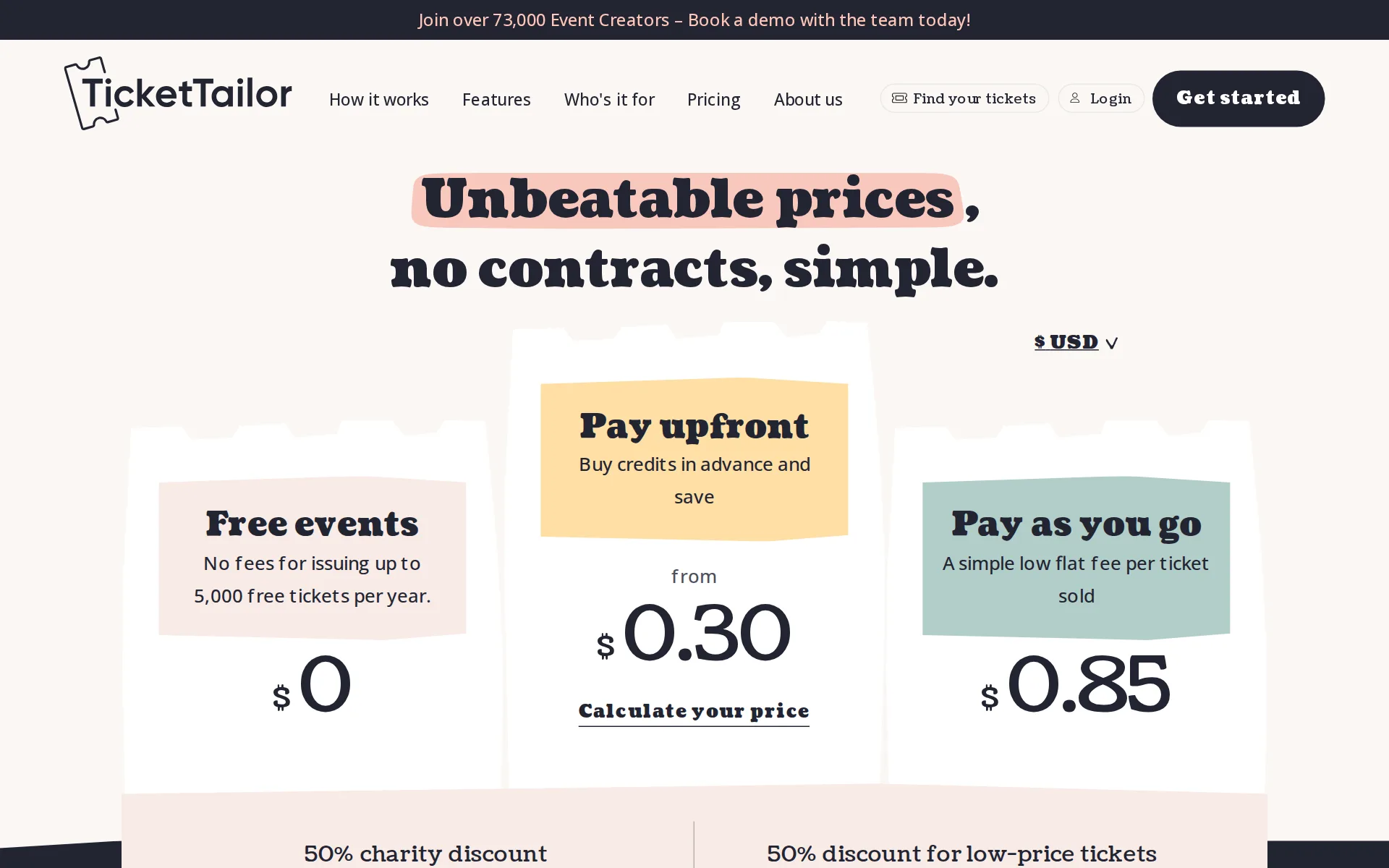
Pricing page, captured
tickettailor.com/en-us/pricing, checked
What we checked on Ticket Tailor
Fees on 200 tickets at $25
$219 in fees on 200 tickets at $25 on Pay upfront, all paid by the organizer: each ticket costs the buyer $25 and the organizer keeps $4,781. The organizer can pass the fees on to buyers instead.
Pay upfront Buy credits in advance and save from £0.22 (about $0.29) per ticket (+ VAT)
Fees on 50 tickets at $25
$54.75 in fees on 50 tickets at $25 on Pay upfront, all paid by the organizer: each ticket costs the buyer $25 and the organizer keeps $1,195.25. The organizer can pass the fees on to buyers instead.
On the page: Pricing hero, 'Pay upfront' plan card
The fee per ticket
One flat fee per paid ticket sold, not a percentage of the ticket price and with no cap needed; a seated ticket costs two usages (one for the reservation, one for the sale) and products, imported tickets and API-issued tickets each cost one.
Your Ticket Tailor fees are a simple flat fee. There is no commission from us based on your ticket prices.
Who pays the fees
The organizer chooses: pay the fee yourself out of the ticket price, or add a booking fee per ticket and/or a transaction fee per order so buyers cover it and you keep the full ticket price.
Yes, you can add any booking fee you like to the ticket price, which means all your fees are covered and you get to keep the entire face value of the…
Card processing
You connect your own Stripe, PayPal or Square account and that processor's fee is charged on top of Ticket Tailor's per-ticket fee, which the vendor states it never touches; it prints 2.9% + $0.30 as an example US Stripe rate but labels those figures illustrative rather than its own.
Ticket Tailor does not touch or process the payment for your tickets. This is all managed via our integration with your chosen payment processor.
All-in price at checkout
For events priced in USD the checkout shows the full amount including booking fees upfront, which the vendor attributes to the FTC junk-fees rule; the same is done for GBP events under UK price transparency law.
the total cost your buyer pays (including booking fees) is displayed upfront for events selling tickets in USD
Free events
Free tickets are genuinely free up to a stated 5,000 per year, after which the vendor asks you to contact support for a quote; free tickets issued through a seating chart still cost one usage each.
No fees for issuing up to 5,000 free tickets per year.
Fees on refunds
Refunding or canceling a ticket does not return the platform fee or the credit to the organizer, so the organizer absorbs it; transferring an order instead avoids a second charge.
If you refund or cancel a ticket, you won't be refunded any ticket credits/PAYG fees to your account, as our service has still been used.
Nonprofit rates
Registered charities get 50% off platform fees permanently, and CICs, B Corps, PTAs, non-profits and BBN members may get 20%; the discount covers prepaid credits and pay-as-you-go only, not white label, custom domains or processing fees.
We offer a 50% discount on our fees for registered charities. The discount only applies to the cost of Pre-pay credits and Pay-as-you-go rates.
Plans and subscriptions
There is no monthly or annual plan to change the fees; billing is purely per usage, either pay-as-you-go or prepaid credits bought in advance at a lower per-ticket rate.
We don't run a subscription model. There are no contracts, and fees are only linked to when you are selling tickets.
Donations and tips
Buyers can add a donation on top of their order once at least one ticket type exists, and Ticket Tailor charges no fee on donations although the payment processor does; the pages say nothing about asking buyers to tip the platform itself.
We do not charge our fee on donations, but your payment system will charge their fee.
Refund protection at checkout
offered, off by default: the organizer must activate Refund Protection in box office settings, after which buyers may optionally add it for 8% of their ticket cost; XCover (CoverGenius) underwrites and handles claims, the buyer pays, and the organizer keeps 10% of the fee.
Refund Protection is purchasable extended ticket terms, provided by XCover (powered by CoverGenius).
Sales tax on tickets
adds a tax line: you set an inclusive or exclusive sales tax/VAT percentage and label per box office or per event, and the vendor states the organizer remains responsible for deciding, collecting and remitting it.
Enter the sales tax percentage amount. Enter the label by which you want to describe your sales tax (e.g. in the UK you would put VAT).
When you get the money
Money goes straight to the organizer's own Stripe, PayPal or Square account as tickets sell rather than being held until after the event, with no Ticket Tailor payout fee; the processor's own schedule then governs the bank transfer.
With Ticket Tailor you don't have to wait until after the event to get paid - we know that's a pain for event creators.
Disputed charges
The organizer bears disputes entirely: because payments go direct to the organizer's processor, Ticket Tailor says it cannot influence the outcome and only supplies evidence such as check-in reports; no dispute fee of its own is stated.
As Ticket Tailor does not handle any payments, and payments are direct from your customer to your Stripe, PayPal or Square account, we are unable to…
Your buyers’ details
The organizer is named as data controller and owns the attendee list outright, exportable from Orders, and the vendor states it will not market to those buyers or share their data.
You own all your ticket buyer and attendee data ... We won't be sending your attendees any marketing emails, sharing their data with anyone
tickettailor.com/legal/gdprChecked
Ticket types and discounts
Multiple ticket types with tiered early-bird releases that unlock as an earlier tier runs low, discount and voucher codes, hidden access-code tickets and bundles or group tickets issued as a single QR code.
You can use tiered pricing within Ticket Tailor to automatically set another higher priced ticket to come on sale when a ticket type is about to sell…
Reserved seating
Buyers pick seats on charts you build for any venue, including tables, booths and accessibility options, with multiple ticket types per seat; each reservation costs one extra usage on top of the ticket fee.
Design and build bespoke seating charts for any venue and allow customers to reserve their preferred seats for your event.
Questions at checkout
The checkout form is customizable beyond the compulsory name and email, and questions can be asked once of the buyer or of every attendee, with answers exportable and addable to confirmations.
If you want every ticket holder to sign your terms, or waiver, select Add an attendee question . If you only need the buyer to add a signature,…
Registration forms and waivers
You build your own registration questions per box office or per event and can require a typed signature against your full terms, which the vendor explicitly positions for signed waivers at physical-activity events.
Collecting a signature during checkout provides an extra layer of confirmation that your buyers have read (and agreed to) your terms and conditions.
Timed entry
Time slot ticketing manages capacity per slot with a buyer-facing calendar view, peak and off-peak price overrides, a demand heatmap and slot-specific email broadcasts.
Running an event across multiple days, or with timed entry? Time slot ticketing will help you to manage capacity, maximise profits at peak times
Waitlist
A waitlist is switched on in an event's advanced settings, collects emails from the event page or widget, can be shown only when tickets are unavailable, and sign-ups are notified by email broadcast.
When your tickets are selling fast, you can set up a waitlist to collect email addresses from prospective ticket buyers who might've missed out.
Online events
Mark the event as online and add a joining link, which is then sent to buyers in the event confirmation email; recurring occurrences can each carry a different streaming link.
You should see a new field to add your online event link – this will be sent to your customers in their confirmation email.
Sell on your own website
An embeddable widget lets buyers complete the purchase on the organizer's own site in list or calendar layouts, with colors, a pop-out cart and a referral tag, instead of sending them to the hosted box office.
You can create a widget that lets customers purchase tickets on your website without having to visit your box office page.
Website builders
native plugin or app: WordPress gets a dedicated plugin and shortcode, while Squarespace, Wix and Weebly are served by the generic HTML embed code; nothing on the pages I read covers Shopify.
The Ticket Tailor WordPress plugin lets you embed event registration forms directly into your WordPress website.
Add-ons
Products can be sold alongside tickets or from a standalone store, covering merchandise and extras like programs, each with its own price, quantity, optional booking fee and fulfillment method; every product sale costs one usage.
You can use Products to upsell merch or extra products alongside your tickets.
Recurring events
A recurring event creates occurrences that share one set of core details and ticket types, so weekly classes, monthly workshops or all-day attraction slots are configured once rather than per date.
Recurring events work by creating ‘occurrences’ of an event, which always share the same core event details and set-up, including ticket types.
Refunds and transfers by buyers
Buyers get a 'Manage tickets' area where the organizer can allow self-service cancellation and refund, rescheduling to another occurrence and resending tickets; the vendor documents no buyer-initiated transfer of a ticket to another person, and several order types fall back to contacting the organizer.
You can choose to let your buyers cancel, reschedule and resend their own orders with self-serve order management.
Check-in app
A free iOS and Android check-in app scans tickets, supports external scanners, multiple staff profiles and live attendance reporting, and works offline provided the door list was downloaded in advance.
The Check-in app can be used offline as long as the doorlist was downloaded in advance, but it needs to be online to sync data.
Door sales
Door sales run through the same free check-in app using Stripe Tap to Pay on an NFC phone, or a Stripe Terminal reader, or cash recorded as an operator payment; all of them incur the normal per-ticket usage fee.
you will need to set up your device and take payment for in-person orders via Stripe Tap To Pay, or by an external method (e.g. cash) recorded as an…
Apple Wallet
Apple Wallet passes are activated per box office under Integrations with your own logo and colors, after which an add-to-Wallet button appears in the buyer's event confirmation email.
A button to add a ticket to an Apple Wallet will appear on the event confirmation email after your customers buy a ticket.
Listed where buyers browse
Events appear on Ticket Tailor's own Discover category pages alongside the hosted box office and event page, and the fee does not change because a sale came from there since the per-ticket fee carries no commission.
Events listed on Ticket Tailor feature on our discover pages as well as a dedicated box office and event page.
Email to buyers
Broadcast emails reach an event's own guest list from inside the platform, but to market a next event to past buyers the vendor points you at exporting the addresses or syncing them to Mailchimp rather than a built-in audience tool.
You can export your attendee email addresses from the 'Orders' section of your dashboard and copy them into your email client of choice.
Ad tracking
Meta pixel plus Conversions API, TikTok pixel and GA4 are supported, but the vendor requires a custom domain on the box office first, and that is a separately billed add-on unless you take white label.
In order to set up Meta pixel tracking, you first need to enable a custom domain for your box office.
Promoter links
Referral tags create unique links per channel, rep or affiliate, including ready-made embeddable buttons, and sales attributed to each tag are reported on the event summary page.
You can also give your ticket reps and affiliates their own unique links and reward them based on how well they sell.
Works with
Direct integrations cover Mailchimp, HubSpot, ActiveCampaign and Constant Contact, with Zapier reaching accounting and database tools such as Xero and Airtable; HubSpot, ActiveCampaign and Constant Contact carry their own monthly charge.
Our Zapier integration makes it easy to connect Ticket Tailor with over 400 other tools and set up actions when something happens in your account –…
API
An open REST API with webhooks and scoped, self-generated keys is available to every account, with public documentation; note that issuing a ticket through it costs one usage even when the ticket is free.
The Ticket Tailor API is available to all of our users, giving you the flexibility of access to your own box office data for integrations or custom…
United States
GBP £ Great British Pound USD $ United States Dollar EUR € Euro AUD $ Australian Dollar BRL R$ Brazilian Real CAD $ Canadian Dollar
On the page: List 'These are the currencies you can choose for your tickets'
Free to start
Yes on two counts: free events pay nothing within the 5,000-ticket annual allowance, and for paid events you can add a booking fee so buyers cover the platform fee and you keep the full ticket price.
If your event has paid for tickets then there are charges, but you can get your customer to absorb the fees via the booking fee - in this instance…
Sign up without a sales call
You sign up and build a box office yourself with no sales contact, and the first five ticket sales are free; a demo booking is offered but is optional rather than a gate.
It's free to set up a Box office, and we're free to use for your first five ticket sales.
Contract
No contract, no subscription and no exclusivity: fees only arise when you sell, and the vendor explicitly says you may run other ticketing companies alongside it, so you can stop between events.
That's no problem, you can do whatever you like – it's your event, we're just here to make your life as easy as possible!
Support on event day
The vendor advertises round-the-clock human support on every plan including free events, but the pages I read name no phone number or stated hours and route you to the help center and a contact-support link.
Get 24/7 customer support from real humans
tickettailor.com/free-eventsChecked
Ticket Tailor alternatives
All 9 alternatives6 more alternatives
8 of the 9 publish a price.
- RunSignupFreeFree endurance-event registration platform billed only through per-transaction processing fees.
- TicketSpiceFrom $0.99 per ticketFlat 99¢-per-ticket ticketing for events and attractions, with in-house payments and a box office app.
- HumanitixFree, then $1.29 per paid ticketNonprofit ticketing: 5% + $1.29 a paid ticket, card processing included, profits to charity.
- UltraSignupFree, then $2.50 per registrationRace registration, results and free timing for trail, ultra and endurance events in North America.


Sources and changes
Last changed
Sources31
- tickettailor.com/en-us/pricing
- help.tickettailor.com/en/articles/12640861-how-to-ask-ticket-buyers-to-sign-a-waiver
- help.tickettailor.com/en/articles/6731528-how-much-does-ticket-tailor-cost-and-how-will-i-be-charged
- tickettailor.com/build-seating-charts
- help.tickettailor.com/en/articles/10058234-how-to-sell-tickets-in-person-using-the-check-in-app
- help.tickettailor.com/en/articles/10429652-how-to-offer-refund-protection-to-your-customers
- help.tickettailor.com/en/articles/11077276-how-to-set-up-tiered-ticket-pricing
- help.tickettailor.com/en/articles/11383453-how-fees-are-displayed-for-events-in-usd
- help.tickettailor.com/en/articles/1549496-where-can-i-add-sales-tax-vat-to-my-tickets
- help.tickettailor.com/en/articles/2748053-how-to-set-up-a-waitlist-for-your-event
- help.tickettailor.com/en/articles/3832434-how-to-set-up-an-online-or-virtual-event
- help.tickettailor.com/en/articles/4476655-how-can-i-set-up-a-recurring-event-with-repeating-dates-or-time-slots
- help.tickettailor.com/en/articles/4593218-how-do-i-connect-to-the-ticket-tailor-api
- help.tickettailor.com/en/articles/5560643-can-i-use-a-meta-tracking-pixel
- help.tickettailor.com/en/articles/6241099-how-to-sell-products
- help.tickettailor.com/en/articles/8687492-what-discounts-do-we-offer
- help.tickettailor.com/en/articles/8826982-how-to-set-up-your-tickets-as-apple-wallet-passes
- help.tickettailor.com/en/articles/8975333-how-can-i-enable-self-serve-order-management-for-my-ticket-buyers
- help.tickettailor.com/en/articles/9071904-what-currencies-can-i-accept
- help.tickettailor.com/en/articles/9330194-when-does-my-check-in-app-sync
- help.tickettailor.com/en/articles/950043-can-i-email-all-of-my-attendees-at-once
- help.tickettailor.com/en/articles/950984-how-to-accept-donations-for-your-event
- help.tickettailor.com/en/articles/950997-how-to-embed-a-box-office-widget-on-your-website
- help.tickettailor.com/en/articles/951067-how-to-connect-ticket-tailor-to-your-other-apps-using-zapier
- help.tickettailor.com/en/articles/951069-how-to-create-referral-and-affiliate-links
- help.tickettailor.com/en/articles/951075-how-to-sell-tickets-on-wordpress
- help.tickettailor.com/en/articles/9630490-what-can-i-do-if-a-ticket-buyer-starts-a-payment-dispute-or-chargeback-after-attending-my-event
- tickettailor.com/free-events
- tickettailor.com/legal/gdpr
- tickettailor.com/list-your-event
- tickettailor.com/manage-time-slots
Is this yours?
Run this platform? Claim the page for free, see its visitors and add the owner mark. You confirm it with an email at tickettailor.com.
Report an error if a fact is wrong.