
RSVPify price and terms
Terms
- Free plan
- YesYesFree plan for events with up to 100 invitees or registrations per event
- Sign up without sales
- YesYes
For AI agents
- API
- Partly
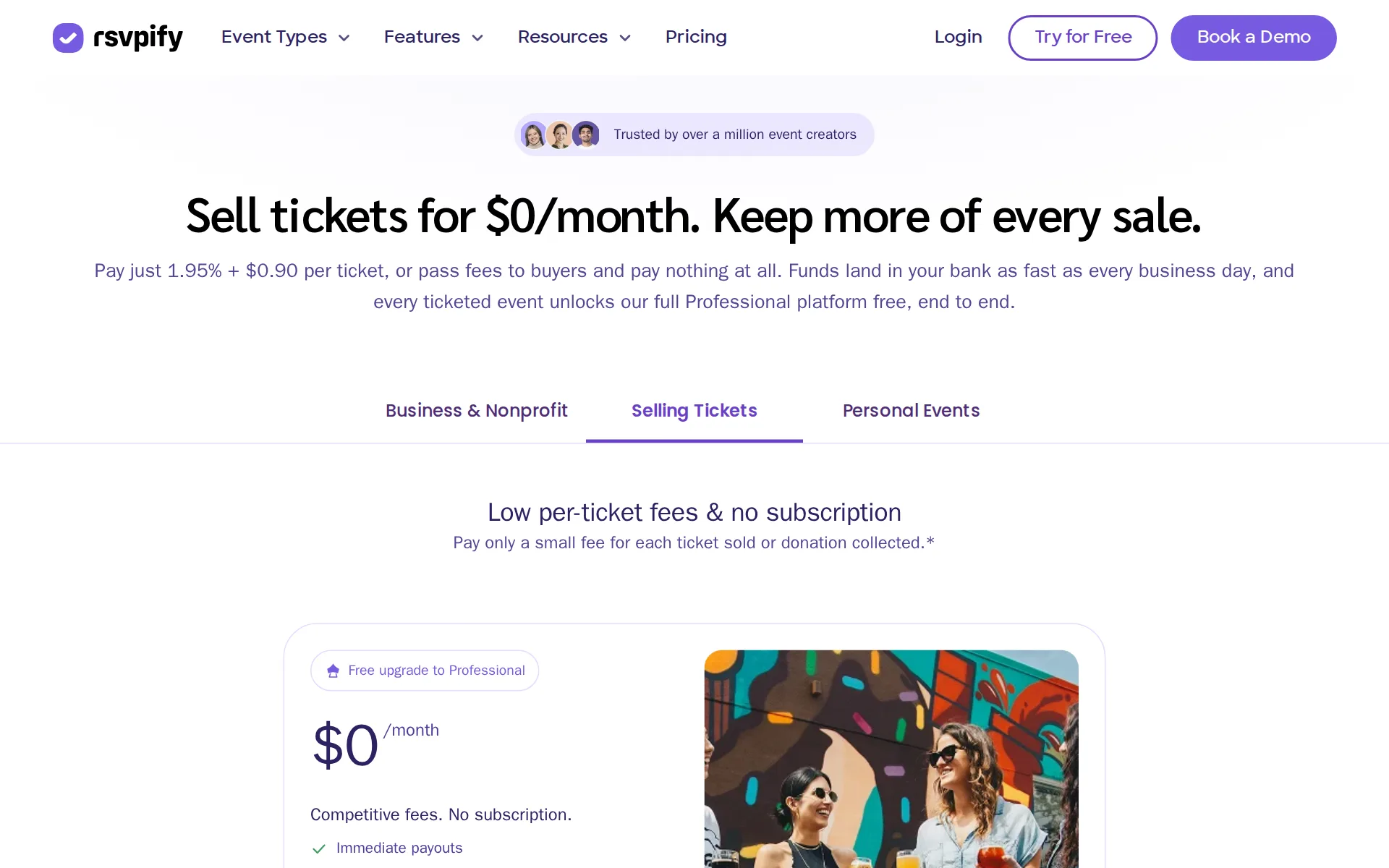
Pricing page, captured
rsvpify.com/pricing/selling-tickets, checked
What we checked on RSVPify
Fees on 200 tickets at $25
$452.50 in fees on 200 tickets at $25 on Ticket sellers, all paid by the organizer: each ticket costs the buyer $25 and the organizer keeps $4,547.50. The organizer can pass the fees on to buyers instead.
RSVPify charges 1.95% + $0.90 USD per ticket or registrant.
Fees on 50 tickets at $25
$113.13 in fees on 50 tickets at $25 on Ticket sellers, all paid by the organizer: each ticket costs the buyer $25 and the organizer keeps $1,136.88. The organizer can pass the fees on to buyers instead.
On the page: Article: Selling tickets with RSVPify: pricing and fees explained — pricing and fees section
The fee per ticket
RSVPify charges ticket sellers a 1.95 percent fee plus 90 cents per registrant.
On the page: Article: Selling tickets with RSVPify: pricing and fees explained — pricing and fees section
rsvpify.com/robots.txtChecked
Who pays the fees
Organizers can choose to add RSVPify fees, card-processing fees, or both to buyer charges.
Choose to pass through credit card processing fees, RSVPify service fees, or both.
rsvpify.com/robots.txtChecked
Card processing
Stripe processing is separately charged at 2.9 percent plus 30 cents per transaction.
2.9% + $0.30 USD per transaction
rsvpify.com/robots.txtChecked
All-in price at checkout
When you pay the fees yourself the advertised ticket price is what buyers pay, but with the setting turned on the service and card fees are added to the buyer's price during checkout rather than shown in the ticket price.
Toggling on this button allows you to pass along any credit card processing and service fees to your customers. This fee will be charged in addition…
Free events
Free events run on the standing free plan and RSVPify says it only earns when a ticket sells, so a free registration carries no platform fee.
RSVPify only earns revenue when tickets are sold.
Fees on refunds
If you refund a buyer, RSVPify keeps its service fee and the order's processing fee, so the organizer carries that cost unless it gives only a partial refund.
Fees for the processing of a given order are non-refundable, and in the event that a ticket purchaser is refunded for their purchase of ticket(s) to…
Nonprofit rates
Nonprofits may qualify for special pricing, but the vendor does not publish a rate.
Annual billing saves up to 38%, and nonprofits may qualify for special pricing.
rsvpify.com/robots.txtChecked
Plans and subscriptions
RSVPify publishes paid Starter, Plus, Professional, and custom Enterprise plans alongside ticket fees.
Paid plans are Starter, Plus, Professional, and Enterprise (custom).
rsvpify.com/robots.txtChecked
Donations and tips
Ticketing can collect donations at checkout, and donations are also a core product.
Sell tickets with multiple tiers, add-ons, promo codes, and donations at checkout, with 48-hour payouts and the option to pass fees to buyers.
rsvpify.com/robots.txtChecked
Sales tax on tickets
adds a tax line: you switch on a sales tax charge, set it as a fixed or percentage amount and label it on the receipt, and nothing says RSVPify files or remits that tax for you.
Below the currency settings, toggle the Sales Tax button on. This feature allows you to add an additional fee to orders.
When you get the money
Stripe-connected ticket funds transfer automatically to the organizer bank account on most business days.
With RSVPify and Stripe, funds are transferred automatically to your bank account, in most cases every business day.
rsvpify.com/robots.txtChecked
Your buyers’ details
The platform lists guest list management and email communications among its core event products.
Core products: event registration and online RSVP forms, event ticketing and donations, online invitations, event website builder, guest list…
rsvpify.com/robots.txtChecked
Ticket types and discounts
Ticketing supports multiple tiers, add-ons, and promo codes; group-ticket rules are not stated.
On the page: robots.txt, Event Ticketing
rsvpify.com/robots.txtChecked
Reserved seating
There is a seating chart, but the vendor describes it as the host dragging guests to tables, with Table Captains letting hosts fill their own tables, not buyers choosing a seat during checkout.
Seating charts Drag-and-drop assignments
Questions at checkout
Custom registration forms use conditional logic and collect attendee data for event organizers.
Custom registration forms with conditional logic, capacity limits, waitlists, and attendee data collection.
rsvpify.com/robots.txtChecked
Registration forms and waivers
Custom registration forms provide conditional logic, capacity controls, and attendee data collection.
On the page: robots.txt, Event Registration
rsvpify.com/robots.txtChecked
Timed entry
Appointment scheduling supports time-slot booking for appointments, tours, and sessions within an event workflow.
Appointment Scheduling: Time-slot booking for appointments, tours, and sessions.
rsvpify.com/robots.txtChecked
Waitlist
Custom registration forms include waitlists alongside capacity limits and conditional logic for controlled event registration.
On the page: robots.txt, Event Registration
rsvpify.com/robots.txtChecked
Online events
You can set the event as virtual or hybrid and sell registration for it, with the vendor's guide showing the meeting link delivered to registrants through its confirmation email.
This guide walks through everything you need to know about using RSVPify + Zoom for your virtual event! Of course, you can replace Zoom with your…
Sell on your own website
RSVPify says RSVP and registration forms can be embedded on any website.
Embed RSVP and registration forms on any website.
rsvpify.com/robots.txtChecked
Website builders
embed only: the vendor names WordPress, Squarespace, Wix and Canva as places the copy-and-paste form works, and documents no dedicated plugin or app; Shopify is not named.
Copy, paste, and collect RSVPs right on your own site. Fully responsive and works with Squarespace, Wix, WordPress, Canva, and more.
Add-ons
Ticketing supports add-ons at checkout in addition to ticket tiers and promo codes.
On the page: robots.txt, Event Ticketing
rsvpify.com/robots.txtChecked
Recurring events
A series is built once: recurring time slots let one event hold many dates and times, each with its own tiers, instead of rebuilding the event for every occurrence.
Recurring Time Slots allows you to create an event only once using our software, with the option to choose and purchase different time slots within…
Check-in app
Check-in is included free with ticketed events, scans QR codes from any internet-connected device with no extra hardware, and adds self check-in kiosks; the pages do not say whether it keeps working without a connection.
Free event check-in system
Door sales
You can take money at the door, but only by offering a pay-later ticket option with payment collected off the platform, so no card terminal or door fee is documented.
Under your ticketing block create the option for your guests to pay at the door. Make sure to leave the payment requirement disabled for this option.
Listed where buyers browse
There is no RSVPify marketplace or consumer app listing your event, and the vendor positions itself against marketplace sites as a platform for organizers who bring their own audience, so no selling commission applies.
RSVPify takes a different approach with a single transparent rate of 1.95% + $0.90 per ticket and no fee stacking, because the platform is built for…
Email to buyers
RSVPify provides branded invitations, reminders, and email campaigns addressed to event guests.
Branded invitations, reminders, and email campaigns to guests.
rsvpify.com/robots.txtChecked
Ad tracking
Both a Meta pixel and Google Analytics are built-in on ticketed events, with custom scripts allowed too, so you can measure registrations driven by paid campaigns.
Facebook Pixel Track registrations and conversions from Meta advertising campaigns.
Works with
RSVPify names native CRM sync and more than thirty integrations, including Stripe and Zapier.
native two-way Salesforce and HubSpot sync, plus Stripe, Zapier, Google Analytics, Blackbaud, Bloomerang, Constant Contact, Klaviyo, and 30+ others.
rsvpify.com/robots.txtChecked
API
The documented programmatic routes are an MCP server for AI assistants, Zapier and webhooks through Zapier; the vendor's own list of integration options names no public API, and it says connecting needs no API key.
Setup takes a few minutes and requires no code, no developer and no separate API key work.
rsvpify.com/aiChecked
Canada
US organizers sell in US dollars to US buyers, and hosts elsewhere sell in their own local currency, including Canada and the UK, provided they hold a bank account in a country Stripe supports.
Event hosts anywhere in the world can use RSVPify to sell tickets and collect payments in their local currency.
Free to start
RSVPify says ticketed events can be created without charge and receive premium features.
RSVPify makes it free to set up a ticketed event and access all premium features.
rsvpify.com/robots.txtChecked
Sign up without a sales call
The DIY plan is a self-service monthly subscription, while Enterprise uses an annual contract.
The DIY plan is a self-service monthly subscription where your team builds and runs everything. Enterprise is a full-service annual contract…
rsvpify.com/robots.txtChecked
Contract
The DIY plan is monthly and self-service, while Enterprise is described as an annual contract.
On the page: Enterprise FAQ — DIY versus Enterprise plan comparison
rsvpify.com/enterpriseChecked
Support on event day
RSVPify documents live chat and email support, but it does not publish event-day hours.
Chat live with our experts and get quick answers and advice on your event.
rsvpify.com/robots.txtChecked
RSVPify alternatives
All 9 alternatives6 more alternatives
8 of the 9 publish a price.
- TicketSpiceFrom $0.99 per ticketFlat 99¢-per-ticket ticketing for events and attractions, with in-house payments and a box office app.
- Ticket TailorFree, then about $0.80 per ticketFlat per-ticket fee ticketing paid into your own Stripe, PayPal or Square account.
- HumanitixFree, then $1.29 per paid ticketNonprofit ticketing: 5% + $1.29 a paid ticket, card processing included, profits to charity.
- RunSignupFreeFree endurance-event registration platform billed only through per-transaction processing fees.


Sources and changes
Last changed
Sources22
- rsvpify.com/robots.txt
- rsvpify.com/pricing/selling-tickets
- help.rsvpify.com/en/articles/1614854-selling-tickets-with-rsvpify-pricing-and-fees-explained
- rsvpify.com/ticket-fee-calculator
- help.rsvpify.com/en/articles/3948351-how-can-i-pass-fees-or-taxes-on-to-my-guests
- help.rsvpify.com/en/articles/5455411-recurring-time-slots-appointment-scheduling
- rsvpify.com/faqs
- rsvpify.com/ai
- rsvpify.com/embeddable-rsvp-form
- help.rsvpify.com/en/articles/1222554-do-my-guests-have-to-enter-their-e-mail-addresses-will-you-use-this-email-address-for-marketing
- help.rsvpify.com/en/articles/1222597-does-rsvpify-offer-phone-support
- help.rsvpify.com/en/articles/1586493-what-currencies-does-rsvpify-support-for-selling-tickets
- help.rsvpify.com/en/articles/1614874-is-it-free-to-collect-cash-donations-and-gifts-with-rsvpify
- help.rsvpify.com/en/articles/2284187-how-do-i-issue-a-refund-for-my-guest-s-ticket-or-payment
- help.rsvpify.com/en/articles/2389959-how-do-i-allow-guests-to-pay-at-the-door
- help.rsvpify.com/en/articles/3945139-how-can-i-offer-discounts-to-my-attendees
- help.rsvpify.com/en/articles/3961051-hosting-an-online-event-with-zoom-and-rsvpify
- help.rsvpify.com/en/articles/4445537-how-do-i-set-up-a-waitlist
- help.rsvpify.com/en/articles/5178298-when-and-how-often-will-i-receive-funds-from-my-event-ticket-sales-into-my-bank-account
- help.rsvpify.com/en/articles/5481764-does-rsvpify-offer-a-nonprofit-discount
- help.rsvpify.com/en/articles/7211680-does-rsvpify-offer-other-ways-of-integrating-besides-zapier
- rsvpify.com/enterprise
Is this yours?
Run this platform? Claim the page for free, see its visitors and add the owner mark. You confirm it with an email at rsvpify.com.
Report an error if a fact is wrong.