


Luma price and terms
Terms
- Free plan
- YesYes
The terms in full
Free forever with unlimited events and guests, 500 invites or newsletters per week, up to 3 calendar admins, and a 5% platform fee on paid tickets.
- Sign up without sales
- YesYes
What needs a higher plan
- Luma Plus
- Sales tax on tickets, Ad tracking, Works with, API
- Enterprise
- Refunds and transfers by buyers
For AI agents
- API
- PartlyLuma Plus
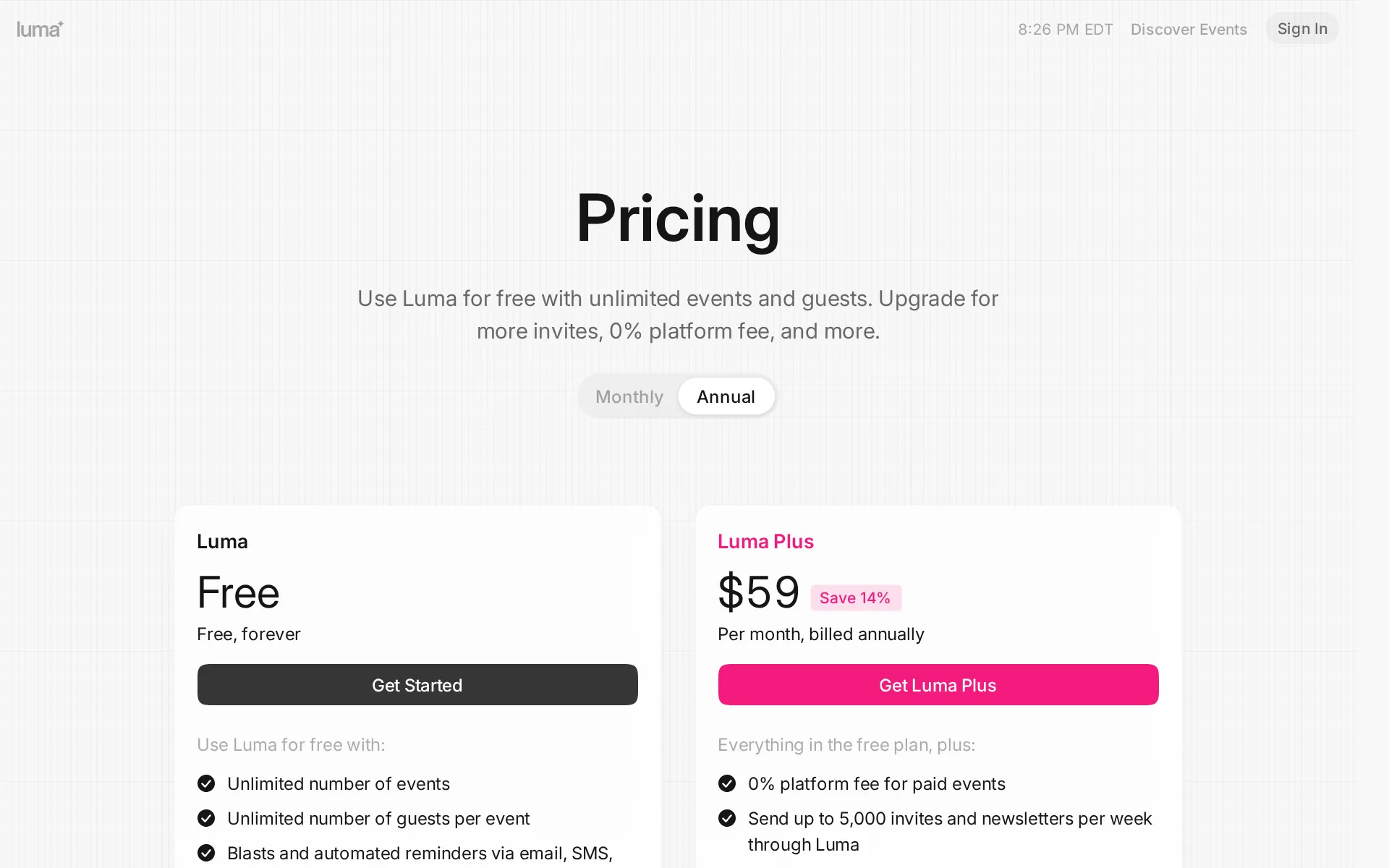
Pricing page, captured
luma.com/pricing, checked
What we checked on Luma
The fee per ticket
Luma charges a flat 5 percent platform fee on each paid ticket on the free plan and nothing per ticket on Luma Plus, with no cap or minimum stated.
5% platform fee for paid events
luma.com/pricingChecked
Who pays the fees
The organizer absorbs both fees out of the ticket price; Luma offers no setting to pass them to buyers, and its advice is to raise the face price instead.
While Luma doesn’t offer an option to add fees on top of ticket prices, you can effectively have customers cover the platform fee by adjusting your…
Card processing
Stripe processes every card payment at roughly 2.9 percent plus 30 cents, charged in addition to Luma's platform fee, and Stripe is the only processor supported.
Stripe, our payment processor, charges a credit card fee (typically 2.9% + 30 cents). The platform fee is on top of the Stripe fee.
luma.com/pricingChecked
All-in price at checkout
The price an organizer sets is the full price a buyer sees and pays, with no platform fee or service fee broken out later in checkout.
Luma always shows customers the full price they’ll pay upfront. Unlike some platforms, we don’t add surprise fees at checkout or break out platform…
Free events
Free events and free tickets cost the organizer nothing: the platform fee applies only to paid tickets, and events and guests are unlimited on the free plan.
Use Luma for free with unlimited events and guests.
luma.com/pricingChecked
Fees on refunds
On a refund the organizer eats both the Stripe fee and Luma's platform fee, which Luma illustrates as $4.25 lost on a refunded $50 ticket.
We don’t charge any additional fee to refund a guest, but you will need to cover the original credit card transaction fee and the Luma platform fee.
Nonprofit rates
Nonprofits get 40 percent off the Luma Plus subscription for as long as they stay subscribed, applied after emailing support with a calendar link.
We have a non-profit discount of 40% off of Luma Plus for as long as you stay subscribed.
Plans and subscriptions
Luma Plus costs $69 a month or $59 a month billed annually per calendar and removes the 5 percent platform fee entirely, leaving only Stripe's card fee.
0% platform fee for paid events
luma.com/pricingChecked
Donations and tips
Ticket types support donation and pay-what-you-want pricing with a suggested price, so supporters can give more; nothing on the site describes a checkout tip to Luma itself.
donation-based pricing - suggest a price, but guests can choose to register for free
Sales tax on tickets
adds a tax line you set per calendar, available only on Luma Plus, and Luma does not remit anything to a tax authority for you.
We do not pay the tax authorities on your behalf. You are responsible for collecting and paying the legally required taxes.
When you get the money
Money lands in the organizer's own connected Stripe account as tickets sell on Stripe's rolling schedule, well before the event, and Luma states no payout fee.
Most Stripe accounts are set to a rolling payout schedule by default, meaning that funds are typically sent on the next business day or shortly after.
Disputed charges
The organizer carries disputes alone: Luma does not contest them for you, lost funds come back out of your Stripe balance, and a penalty may apply depending on your Stripe account.
Luma does not handle disputes on your behalf. You are responsible for refunding guests and responding to your disputes.
Your buyers’ details
Guest names, emails, phone numbers and answers export as CSV at any time and you can email them from Luma, provided they consented; cold emailing is banned.
You can download your event’s guest list as a CSV file, which includes registration details, ticket information, coupon codes, and custom responses.
Ticket types and discounts
Multiple ticket types with their own prices, sales start and end times for early-bird pricing, capacity, coupons and group purchasing are all on the free plan.
Set up ticket types, group purchasing and coupons
luma.com/pricingChecked
Reserved seating
Luma states plainly that it has no seat maps and points organizers who need seat selection to Eventbrite or Ticket Tailor instead.
Does Luma support reserved seating? No. If you need seat maps, Eventbrite is the better fit.
Questions at checkout
You can add your own registration questions of several types, but they apply to the whole event: Luma supports neither per ticket type questions nor branching logic.
We do not support questions specific to a given ticket type.
Registration forms and waivers
Registration questions cover text, options, phone, website and a Terms type that collects consent and an optional signature, which covers a waiver.
This is especially useful if you have a legal form that your guests need to sign before joining the event.
help.luma.com/p/event-termsChecked
Timed entry
Luma names timed entry as a reason to pick Ticket Tailor instead and lists timed-entry slots among that product's box office tools, with no equivalent of its own.
If you run a venue or box office and need reserved seating, timed entry, or a low flat fee per ticket, Ticket Tailor is built for that.
Waitlist
A waitlist opens when the event hits capacity and works for paid tickets too: the card is authorized on joining and charged only when the host approves.
Waitlists can be used with free and paid tickets.
help.luma.com/p/waitlistChecked
Online events
Online and hybrid events are supported, with Zoom or Google Meet links created automatically for registrants and attendance tracked from the join link.
Zoom integration with attendance tracking
luma.com/pricingChecked
Sell on your own website
Two embeds let buyers register on your own site: a button that opens checkout in an overlay, or the event page itself inside an iframe with checkout in place.
Embed a checkout button or the full event page on your site so visitors can register without leaving.
Website builders
embed only: Luma documents a copy-and-paste HTML snippet for any site, and names no WordPress plugin or Squarespace, Wix or Shopify app.
Copy the code snippet and paste it into your website, and congrats
Add-ons
There is no merchandise or parking add-on product; Luma's own answer for extras like tables is to model them as separate high-priced ticket tiers with limited quantity.
There’s no dedicated bottle-service feature, but many hosts model tables as high-priced ticket tiers with limited quantity.
help.luma.com/p/luma-vs-poshChecked
Recurring events
Luma calls its recurring options workarounds: cloning duplicates an event with its settings across dates, but there is no single recurring event with one registration.
The easiest way to create multiple sessions is to use the Clone Event feature.
Refunds and transfers by buyers
Buyers cannot refund themselves, since hosts issue every refund from the guest list, and guest-to-guest ticket transfer is limited to Enterprise plans.
Ticket transfer is currently only available on our Enterprise plans.
Check-in app
The free iOS and Android apps scan each guest's QR code at the door in standard or express mode; Luma does not state whether the scanner works without a connection.
Every guest receives a QR code when they register. Scan it at the door to check them in, or search for their name on the guest list to check them in…
help.luma.com/p/check-inChecked
Door sales
Walk-ups buy on the event page from their own phone at the same fees as online sales; card payments and cash collection inside the Luma app are still being built.
Note: We’re working on additional features to support card payments and cash collection directly through the Luma app.
Apple Wallet
Guests add the ticket to Apple Wallet from the ticket view on iOS, and the pass carries the same QR code and works without an internet connection.
When you register for an in-person event on Luma, you can add your ticket to Apple Wallet (iOS) or Google Wallet (Android).
Google Wallet
Android guests add the same pass to Google Wallet, it updates automatically when event details change, and it is marked expired if registration is canceled.
On the page: Mobile Wallet Passes, opening paragraph
Listed where buyers browse
Public in-person events can be featured on Luma's explore pages in more than 50 cities at no extra fee, but a curation team decides and hosts cannot submit their way in.
Featured events are picked by our curation team.
Email to buyers
Newsletters and event blasts reach a calendar's past guests and followers by email, SMS, push and WhatsApp, within a weekly send limit that depends on the plan.
Newsletters let you communicate directly with your calendar’s people. You can share updates, promote upcoming events, and keep your community engaged.
Ad tracking
A Meta pixel and a Google Analytics measurement ID can be attached to event and calendar pages, but both settings require a Luma Plus subscription.
With Luma Plus, you can set up a Meta Tracking Pixel to track guest registrations.
Promoter links
Promoters get tracked utm_source links and their own coupon codes with per-link registration counts in insights, but Luma calculates and pays no commission.
On Luma you track sales per promoter and pay them yourself
help.luma.com/p/luma-vs-poshChecked
Works with
Zapier reaches Mailchimp, Sheets and Airtable and webhooks are available, but both Zapier and the API need Luma Plus, and HubSpot and Salesforce sync is Enterprise.
You’ll need Luma Plus to use either the API or Zapier.
help.luma.com/p/integrationsChecked
API
A documented REST API at docs.luma.com manages events, guests and calendars, but access is gated behind the Luma Plus subscription.
On the page: Integrations, opening paragraph
help.luma.com/p/integrationsChecked
Free to start
Free events cost the organizer nothing at all, but paid tickets on the free plan give up 5 percent to Luma plus Stripe's card fee out of the organizer's proceeds.
On the page: Pricing page, free Luma plan feature list
luma.com/pricingChecked
Sign up without a sales call
You sign up and publish a paid event the same day with no sales call, and Luma says it is not scheduling live demos at all right now.
We aren’t scheduling live demos of Luma now. But you can try out most of the functionality of Luma on our website.
Contract
There is no contract on the free plan and Luma Plus can be canceled or set to stop renewing at any time; Luma names no exclusivity for selling elsewhere.
There you will be able to update your payment method, change your plan, or turn off auto-renewal.
Support on event day
Support runs by email to support@luma.com with priority handling for Luma Plus subscribers; Luma publishes no phone line, live chat or response hours.
Priority support
luma.com/pricingChecked
Luma alternatives
All 9 alternatives6 more alternatives
8 of the 9 publish a price.
- Ticket TailorFree, then about $0.80 per ticketFlat per-ticket fee ticketing paid into your own Stripe, PayPal or Square account.
- EventbriteFree, then $69 a monthTicketing platform with a buyer-discovery marketplace and optional fee transfer.
- ZeffyFreeFree fundraising platform for nonprofits with event ticketing, auctions and a built-in donor CRM.
- TicketSpiceFrom $0.99 per ticketFlat 99¢-per-ticket ticketing for events and attractions, with in-house payments and a box office app.


Sources and changes
Last changed
Sources32
- luma.com/pricing
- help.luma.com/p/creating-a-paid-event
- help.luma.com/p/embed-luma-on-your-website
- help.luma.com/p/integrations
- help.luma.com/p/luma-vs-eventbrite
- help.luma.com/p/luma-vs-posh
- help.luma.com/p/mobile-wallet-passes
- help.luma.com/p/sending-newsletters
- help.luma.com/p/canceling-luma-plus
- help.luma.com/p/check-in
- help.luma.com/p/cloning-events
- help.luma.com/p/collect-registration-questions
- help.luma.com/p/contacting-event-hosts
- help.luma.com/p/disputed-payments
- help.luma.com/p/download-guest-csv
- help.luma.com/p/event-referrals
- help.luma.com/p/event-terms
- help.luma.com/p/facebook-meta-tracking-pixel
- help.luma.com/p/featuring-your-event-on-luma
- help.luma.com/p/luma-api
- help.luma.com/p/luma-for-non-profits
- help.luma.com/p/luma-vs-humanitix
- help.luma.com/p/luma-vs-ticket-tailor
- help.luma.com/p/multi-session-recurring-events
- help.luma.com/p/refunding-a-guest
- help.luma.com/p/scheduling-a-demo
- help.luma.com/p/selling-in-person-tickets
- help.luma.com/p/setting-up-ticket-types
- help.luma.com/p/taxes-and-vat
- help.luma.com/p/ticket-transfer
- help.luma.com/p/understanding-payouts-and-event-proceeds
- help.luma.com/p/waitlist
Is this yours?
Run this platform? Claim the page for free, see its visitors and add the owner mark. You confirm it with an email at luma.com.
Report an error if a fact is wrong.