
Givebutter price and terms
Terms
- Free plan
- YesYesThe core platform is free forever at $0/month with unlimited contacts
The terms in full
only the optional Givebutter Plus subscription is paid, and it has a 30-day commitment-free trial.
- Sign up without sales
- YesYes
For AI agents
- API
- Yes
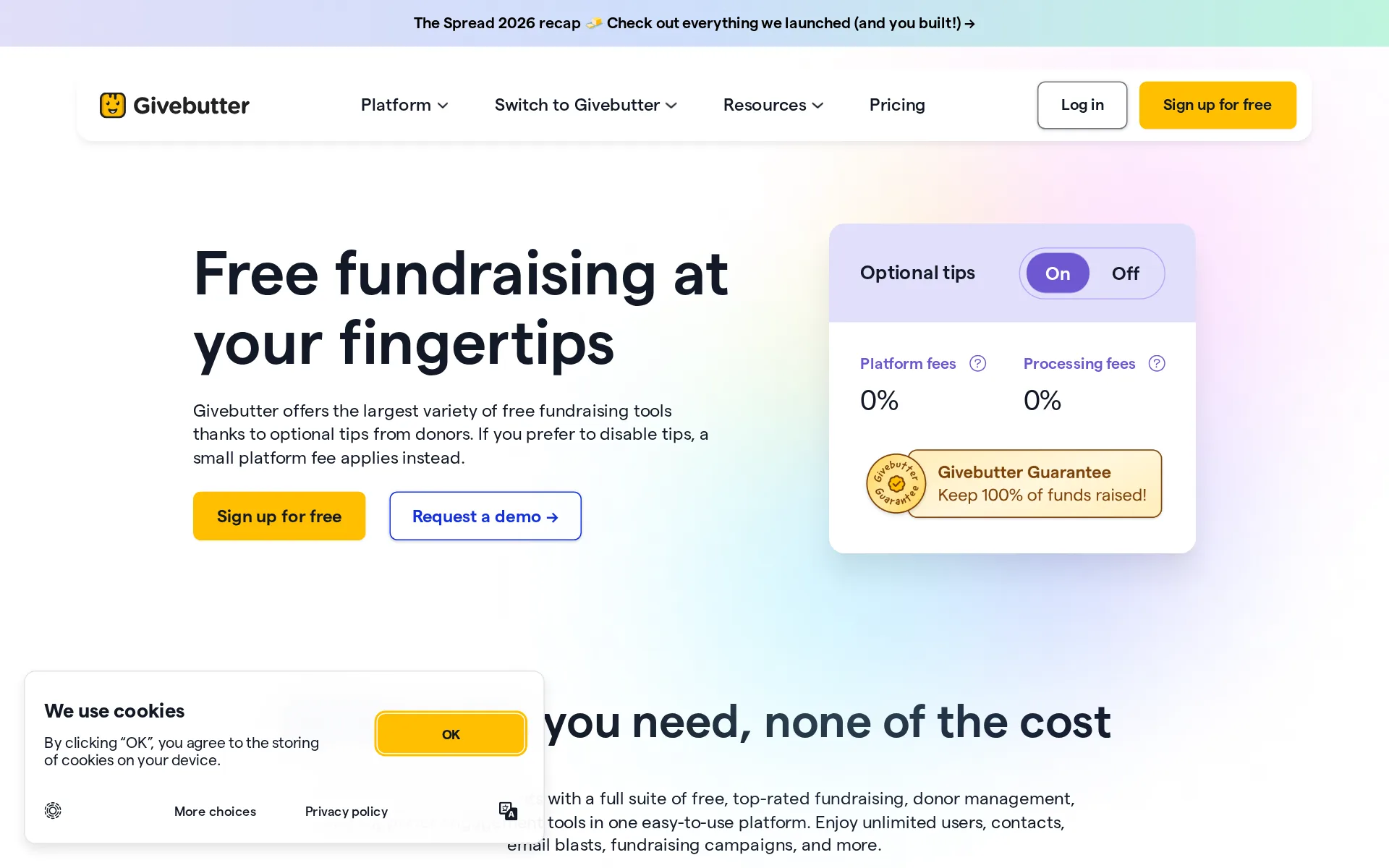
Pricing page, captured
givebutter.com/pricing, checked
What we checked on Givebutter
Fees on 200 tickets at $25
$180.23 in fees on 200 tickets at $25 on Free forever, all paid by buyers: each ticket costs the buyer $25.90 and the organizer keeps $5,000.
0% platform fees across all campaign types when tips are enabled. If you disable tips, a flat 3% platform fee applies.
givebutter.com/pricingChecked
Fees on 50 tickets at $25
$45.06 in fees on 50 tickets at $25 on Free forever, all paid by buyers: each ticket costs the buyer $25.90 and the organizer keeps $1,250.
On the page: Pricing hero, Optional tips On column, Platform fees row
givebutter.com/pricingChecked
The fee per ticket
The organizer pays nothing while optional donor tips stay on; switch tips off and a flat 3% platform fee plus 2.9% + $0.30 card processing applies per transaction, with ACH at 1.9% + 30¢ for verified nonprofits.
If you wish to disable optional tips on your campaign, a 3% platform fee applies to every donation, plus processing fees (2.9% + $0.30 per…
Who pays the fees
You choose per campaign: ask buyers to cover fees optionally, require them to cover fees so you keep 100%, or hide fees and pay the fee yourself, out of the ticket price.
Ask donors to cover fees – Donors will be asked to optionally cover fees. Uncovered fees are deducted from funds raised on this campaign. Require…
Card processing
Stripe processes payments at 2.9% + 30c for cards and digital wallets and 1.9% + 30c for ACH on verified nonprofit accounts; with tips enabled that cost sits with donors or with Givebutter rather than the organizer.
2.9% + 30¢ - Credit cards, digital wallets (Venmo, Apple Pay, PayPal, etc.) 1.9% + 30¢ - ACH (for verified nonprofits only)
All-in price at checkout
Checkout shows the donation, the processing fee and the optional tip as separate added lines rather than one all-in price, and with tips enabled those fees cannot be hidden from donors.
On the page: What are tips? section, example breakdown of a campaign checkout
Free events
Free tickets are a supported ticket setting and cost nothing to issue, since both the platform fee and the processing fee are charged per transaction value; unlimited free and paid ticket types are available on the free plan.
Price (required) – The price of the ticket, or tick the checkbox if this is a free ticket.
Nonprofit rates
There is no separate charity rate because the platform is free for every organization, but verification as a nonprofit is what unlocks the cheaper ACH rate of 1.9% + 30c and instant payouts.
1.9% + 30¢ - ACH (for verified nonprofits only)
Plans and subscriptions
Givebutter Plus is an optional subscription starting at $33.80 monthly or $29 a month billed annually for up to 250 contacts, and it changes no fees at all.
Yes, Givebutter Plus has all of the the same options for donor tipping, platform fees, and payment processing fees.
givebutter.com/pricingChecked
Donations and tips
Buyers can add a donation to a ticket order or give without attending, and checkout asks them for an optional tip to Givebutter, which is how the fee-free option is funded.
Encourage supporters to donate when they buy a ticket or give even if they can’t attend.
When you get the money
Money reaches your own bank as tickets sell rather than after the event: funds clear on a 48-72 hour rolling basis, standard withdrawals are free and take 3-5 business days, and an optional instant payout costs 1.75%.
All donations become available for withdrawal on a 48-72 hour rolling basis after a donation is made. ... standard disbursements take 3-5 business…
Disputed charges
Givebutter argues a buyer disputing the charge with their bank for you and needs no action from the organizer, but a lost dispute leaves the money with the buyer and your balance negative until you cover it; no separate dispute fee is documented.
If we lose the dispute with the bank (meaning the donor disagrees that they authorized the charge), the bank returns the money to the donor, and the…
Your buyers’ details
Ticket buyers land in your own CRM as contacts with exportable ticket and contact details, and the built-in email and SMS tools let you market to them afterwards without restriction from Givebutter.
Centralized hub for all your contacts and transactions
givebutter.com/pricingChecked
Ticket types and discounts
You can create unlimited ticket types with set quantities, VIP and table bundles, bulk discounts and promo codes, though promo codes currently apply to the whole order rather than a single item.
Offer individual tickets, VIP experiences, tables, bundles, and bulk discounts, with custom fields to collect the details you need.
Reserved seating
Seating exists but the organizer does the seating: tables and sections are built in the dashboard and ticketholders are dragged into seats by staff, with seat and table shown at check-in rather than chosen by the buyer at checkout.
Using a simple drag-and-drop interface, you can create seating groups, assign tickets to specific seats, and keep groups together – all in just a few…
Questions at checkout
Custom fields can be attached to an individual ticket type or applied to every ticket, and campaign-level fields ask once per order; text, number, checkbox, dropdown and file upload answers all export with the tickets.
Ticket custom fields allow you to collect additional information based on the specific types of tickets purchased by a supporter.
Registration forms and waivers
Registration fundraising turns sign-up into a form with your own custom fields, and the vendor documents putting a waiver or terms link into a field description with HTML so attendees must read and agree at checkout.
Descriptions allow the use of HTML, which is ideal if you'd like to add a link to a waiver, disclaimer, or terms.
Online events
Digital and hybrid event types are first-class, with separate in-person and digital ticket types and a livestream you can host on Givebutter or embed from YouTube, Vimeo, Twitch or Facebook for ticketholders.
Digital – Livestream on Givebutter or on your own. ... Hybrid – Run a hybrid in-person and digital event – also supports livestream.
Sell on your own website
Widgets embed the ticket checkout on your own site so buyers pay without being redirected, but an embedded event widget carries only the checkout flow, not the campaign page with its story and goal bar.
Donors can submit a transaction (or purchase tickets) directly on your site without being redirected.
Website builders
native plugin or app for WordPress and Wix, where a free plugin and a dashboard-level Wix integration exist; Squarespace, Weebly and GoDaddy are embed-code only, and no Shopify route is documented anywhere I read.
In order to install Widgets on your WordPress.com or WordPress.org site, you'll first need to download the free Givebutter Widgets plugin.
Add-ons
Extras ride along as ticket records: the ticket builder is used for entry tickets, raffle tickets and items for sale, and bundles let you package a table or add-on into one purchasable unit.
you can sell unlimited tickets, including entry tickets (ie. general admission, VIP), as well as raffle tickets or items for sale!
Recurring events
There is no scheduler for a series: the documented route for repeating an event is duplicating the campaign, which copies the setup but creates a separate campaign each time you run it.
Duplicate campaign
Refunds and transfers by buyers
Buyers manage tickets themselves in the portal, editing attendee names and assigning a ticket to a guest without contacting you, but refunds are not self-serve: all transactions are final and must be requested from the organization or support.
From your Givebutter Portal, you can view and save your event tickets, update attendee details, and assign tickets to guests, all without needing to…
Check-in app
The iOS and Android app is free and scans ticket QR codes or looks guests up by name, email, phone or ticket number, and limited-access volunteers can scan too; the vendor does not document whether scanning works without a connection.
The ticket scanner uses your mobile device's camera to scan the QR code on a donor's ticket.
Door sales
Any app user can sell at the door by Tap to Pay, Bluetooth card reader, cash or check, but door card sales always carry the 3% platform fee on top of 2.9% + 30c even on campaigns where tips are enabled; cash and check carry no processing fee.
In addition to the 2.9% + 30 cents transaction fee, there is a 3% platform fee (5% for accounts on Legacy pricing) on all tickets sold via the app,…
Apple Wallet
Buyers add the ticket to Apple Wallet from the ticket email or the donor portal on a mobile browser, and the pass works at the door without a connection.
Tap the Add to Apple Wallet badge displayed in your ticket email, or in the portal from your mobile browser.
Google Wallet
Google Wallet passes are advertised as still on the way while Apple Wallet already ships, so Android guests currently use the PDF ticket or the QR code in their portal instead.
Guests can keep tickets handy with Apple Wallet passes, with Google Wallet passes coming soon.
Email to buyers
Past buyers sit in the CRM and can be segmented and emailed from the built-in editor at no cost, with automatic event reminders one hour and 24 hours before the event and follow-ups afterwards.
Send automatic reminders, personalized follow-ups, and thank-yous with built-in free email marketing tools.
Ad tracking
A Meta Pixel ID can be pasted into account settings and fires purchase and checkout events with ticket value, and Google Analytics connects too, but the pixel only measures Facebook Ads traffic and is not yet supported on embedded Form campaigns.
Meta Pixels are not yet supported on embedded Givebutter Form campaigns.
Promoter links
Peer-to-peer and registration fundraising give each supporter or team their own page and link with their own goal and amount raised, and ticket types can be restricted so only registered fundraisers may buy them.
attendees can register and start peer-to-peer fundraising in one seamless flow, complete with their own fundraising page.
Works with
Zapier connects Givebutter to thousands of apps using an API key, and native integrations include Bloomerang, Meta, Google Analytics and monday.com; the QuickBooks Online accounting sync is reserved for the paid Plus plan.
QuickBooks Online integration ... Seamlessly sync every donation with your accounting software
givebutter.com/pricingChecked
API
A free public REST API with documented endpoints is available to every account, with self-service key generation in the dashboard under Settings then Developers, though only admins can reach that tab.
Givebutter is proud to be among the few fundraising platforms that offer a free, open, and public API for developers.
Free to start
Keeping donor tips enabled means the organization pays zero platform and zero processing fees, with Givebutter covering anything donors decline to cover under its Guarantee.
Givebutter is free to use, thanks to the 100% optional tips we receive from donors. As long as tips are enabled on your campaign, you'll pay no…
Sign up without a sales call
Sign-up is self-service and free with no sales call, though a campaign stays inactive until you add valid payout information, and a demo is offered rather than required.
you must add valid payout information before you can go live with your first campaign.
Contract
No contract or exclusivity is documented for the free account you sell tickets on, and the optional Plus subscription can be canceled from the dashboard at any time, ending at the close of the billing period.
You can cancel your Givebutter Plus plan from your dashboard at any time. Cancellation will take effect at the end of your current billing period
givebutter.com/pricingChecked
Support on event day
Chat and email support run 24 hours a day including weekends and holidays for every account, which covers a door opening at any hour; phone support is Plus-only, 8am to 1am ET, and needs a PIN from the dashboard.
Our chat and email support team is available 24 hours a day, 7 days a week! ... Phone support is available to Givebutter Plus subscribers, 7 days a…
Givebutter alternatives
All 9 alternatives6 more alternatives
8 of the 9 publish a price.
- TicketSpiceFrom $0.99 per ticketFlat 99¢-per-ticket ticketing for events and attractions, with in-house payments and a box office app.
- Ticket TailorFree, then about $0.80 per ticketFlat per-ticket fee ticketing paid into your own Stripe, PayPal or Square account.
- RSVPifyFree, then $0.90 per ticketRegistration, ticketing, guest management, seating, and QR-code check-in in one platform.
- RunSignupFreeFree endurance-event registration platform billed only through per-transaction processing fees.


Sources and changes
Last changed
Sources18
- givebutter.com/pricing
- help.givebutter.com/en/articles/1512762-givebutter-standard-pricing-explained
- help.givebutter.com/en/articles/3661362-how-to-create-and-edit-tickets
- givebutter.com/features/event-ticketing
- help.givebutter.com/en/articles/3688279-how-to-configure-an-event-campaign
- help.givebutter.com/en/articles/17234450-how-to-manage-your-event-tickets
- help.givebutter.com/en/articles/1761146-how-to-withdraw-funds
- help.givebutter.com/en/articles/11731317-how-to-create-event-seating-arrangements
- help.givebutter.com/en/articles/1726542-supported-countries-and-currencies-on-givebutter
- help.givebutter.com/en/articles/1726556-how-to-contact-givebutter
- help.givebutter.com/en/articles/2852270-how-to-scan-tickets-and-check-guests-in
- help.givebutter.com/en/articles/3831687-how-to-integrate-meta-pixel-with-givebutter
- help.givebutter.com/en/articles/4117457-tips-fees-and-our-commitment-to-100-transparency
- help.givebutter.com/en/articles/5489015-how-to-access-the-givebutter-public-api-key
- help.givebutter.com/en/articles/6464859-how-to-use-givebutter-widgets-on-your-website
- help.givebutter.com/en/articles/6868930-how-to-use-the-givebutter-mobile-app
- help.givebutter.com/en/articles/7141647-how-to-use-givebutter-widgets-on-a-wordpress-website
- givebutter.com/fundraising-events
Is this yours?
Run this platform? Claim the page for free, see its visitors and add the owner mark. You confirm it with an email at givebutter.com.
Report an error if a fact is wrong.