
FooEvents price and terms
Terms
- Free plan or trial
- NoNo
- Sign up without sales
- YesYes
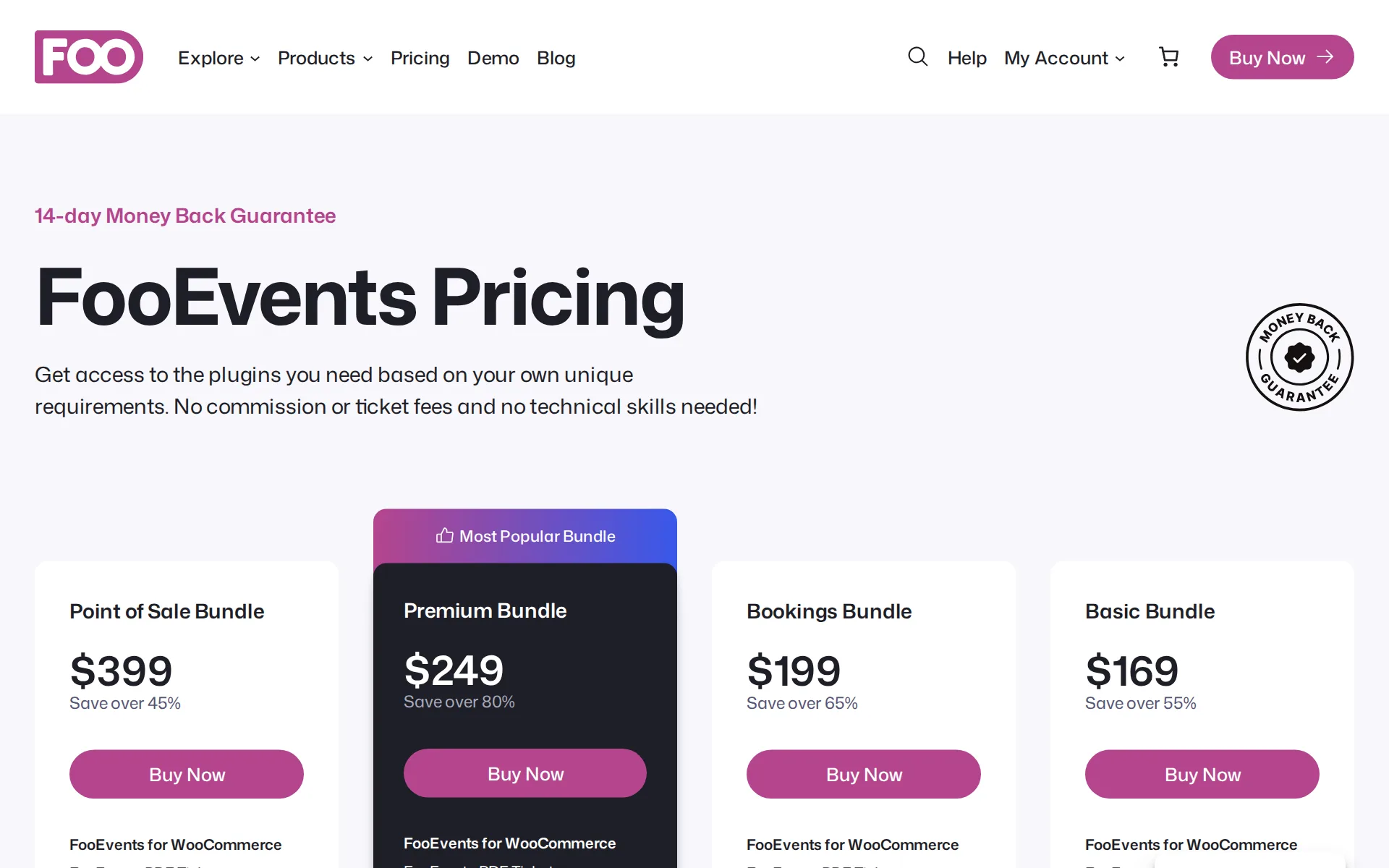
Pricing page, captured
What we checked on FooEvents
Fees on 200 tickets at $25
$183.25 in fees on 200 tickets at $25 on FooEvents for WooCommerce, all paid by the organizer: each ticket costs the buyer $25 and the organizer keeps $4,816.75. The subscription is billed yearly. The figure counts one month of it.
We don’t charge commission or per-ticket fees. Every cent you earn from ticket sales is yours to keep.
fooevents.comChecked
Fees on 50 tickets at $25
$52 in fees on 50 tickets at $25 on FooEvents for WooCommerce, all paid by the organizer: each ticket costs the buyer $25 and the organizer keeps $1,198. The subscription is billed yearly. The figure counts one month of it.
On the page: Homepage statistics band, 'Zero Ticket Fees or Commission'
fooevents.comChecked
The fee per ticket
FooEvents takes no percentage and no fixed amount per paid ticket; the only cost is an annual plugin license per domain.
On the page: Homepage statistics band, 'Zero Ticket Fees or Commission'
fooevents.comChecked
Who pays the fees
There is no platform fee for either side to carry, so nothing is added to the buyer's price by FooEvents; the organizer pays only the license.
Sell event tickets directly from your own website without paying per-ticket commissions to a third-party ticketing platform.
Card processing
Card payments run through the organizer's own WooCommerce payment provider, so the rate is whatever that provider charges; FooEvents publishes no processing rate of its own.
Payments are processed by WooCommerce, which means you can choose from over 100 popular payment gateways, including Stripe, Square, PayPal, credit…
All-in price at checkout
FooEvents adds no fee at checkout, so the listed ticket price is what buyers pay, but whether tax appears in the displayed price is a WooCommerce setting the organizer chooses.
Local Currency and Taxes Sell tickets in your local currency and apply tax rules based on your WooCommerce settings.
Free events
Free events and free registrations are fully supported and still issue tickets, and FooEvents charges nothing per ticket either way.
Sell tickets or register attendees for free events. Attendees will be issued tickets and registered on your system which is great for building a…
Fees on refunds
FooEvents keeps no ticket fee to refund and refunds are issued in WooCommerce or at the point of sale, but the vendor does not say what the organizer's own card processor retains.
Issue refunds directly from FooEvents POS, helping your team manage customer service and order adjustments without switching between multiple systems.
Nonprofit rates
Registered nonprofits can apply for a 50% discount on the first license year and on renewals, granted as a coupon after the vendor reviews an application form.
we offer registered nonprofit organizations (NPOs) a 50% discount on the first year of their license and on annual renewal fees.
Plans and subscriptions
The license is an annual subscription per domain covering 12 months of updates and support, and it changes nothing about ticket fees because there are none.
A license entitles you to 12 months of updates and support from the date of purchase. ... All purchase options are billed annually but you can cancel…
Sales tax on tickets
adds a tax line you set: tax rates come from the organizer's own WooCommerce tax settings and apply to online and door sales, with FooEvents never remitting anything.
FooEvents POS uses the built-in WooCommerce Tax Settings when applying taxes to orders. This means that any tax settings and tax rates that have…
When you get the money
Ticket money lands in the organizer's own payment account as sales happen because FooEvents never holds funds, and there is no payout fee.
Nope! Tickets and bookings are sold directly from your own website and payments are processed via any payment gateway that WooCommerce supports.…
Your buyers’ details
Buyer and attendee records stay in the organizer's own WordPress database, can be exported to CSV, and can be pushed to Mailchimp for emailing.
Attendee data is stored in your own WordPress/WooCommerce database, giving you direct access to your registration records without relying on a…
Ticket types and discounts
Ticket tiers are built as WooCommerce product variations, so early-bird, member and group options work, and WooCommerce coupons cover promo codes.
Use WooCommerce variable products to create ticket types such as General Admission, VIP, Early Bird, Student, Member, or other pricing options.
Reserved seating
Buyers can pick seats on an interactive chart, but only with the separately licensed FooEvents Seating extension on top of the core plugin.
Create seating charts that let attendees select their seats when purchasing tickets.
Questions at checkout
Your own questions can be asked per attendee at checkout, but that needs the separately licensed FooEvents Custom Attendee Fields extension.
Collect information for each individual attendee, making it easier to manage events where every ticket holder may have different details,…
Registration forms and waivers
Registration forms with your own required fields, including waiver and consent acceptance, come from the paid Custom Attendee Fields extension rather than the core plugin.
Waiver, consent, or terms acceptance
Timed entry
Timed slots with per-slot capacity are sold through the separately licensed FooEvents Bookings extension, which also hides slots that are full.
Set availability for individual booking dates and slots, including limited or unlimited stock.
Online events
Events can be linked to Zoom meetings or webinars and buyers are registered automatically when they buy, covering virtual and hybrid events.
Link events to Zoom meetings or webinars and automatically register attendees when they purchase tickets, making it easier to manage virtual and…
Sell on your own website
The whole sale happens on the organizer's own site: events are WooCommerce products with their own pages and the store's normal checkout.
FooEvents works directly with WordPress and WooCommerce, so it fits into your existing website instead of sending customers to a separate ticketing…
Website builders
native plugin or app: FooEvents is a WordPress plugin and needs WooCommerce installed, so it does not serve Squarespace, Wix or Shopify sites.
Yes, if you want to sell tickets, take bookings, process payments, or manage paid registrations. FooEvents uses WooCommerce for products, checkout,…
Add-ons
Because events are WooCommerce products, merchandise and other physical goods can be sold in the same order as the tickets.
Use WooCommerce to sell event tickets, physical products, digital downloads, and other products from the same online store.
Recurring events
Repeating and multi-day event formats are supported, including conferences that recur on chosen dates, so a series need not be rebuilt each time.
Create single-day, multi-day, and virtual conferences.
Check-in app
The iOS and Android Check-ins apps are free with a license, scan QR codes and barcodes, and keep working offline until a connection returns.
Keep checking in attendees even if your internet connection drops. The FooEvents Check-ins app can continue working offline and sync the check-in…
fooevents.com/products/appsChecked
Door sales
Door and box office selling with printed tickets, card readers or cash needs the separately licensed FooEvents POS extension; no per-ticket fee is charged on those sales.
Accept card payments directly in FooEvents POS using supported Stripe and Square card readers. You can also use default or custom payment methods,…
Apple Wallet
Apple Wallet passes work only through the third-party AddToWallet service, which the organizer signs up for and buys pass credits from separately.
FooEvents for WooCommerce integrates with AddToWallet to allow your attendees to add FooEvents tickets with QR codes to Apple Wallet or Google Wallet…
Google Wallet
Google Wallet passes also rely on the third-party AddToWallet service and its prepaid pass credits, consumed only when an attendee actually adds the pass.
Please note that a credit will only be used if an attendee actually adds the pass to their Wallet, and not automatically for every FooEvents ticket…
Listed where buyers browse
There is no FooEvents marketplace or app that lists events; sales happen on the organizer's own site, though events can optionally be pushed to Eventbrite.
On the page: FAQ, 'How can FooEvents integrate with my website?'
Email to buyers
Past buyers can be emailed, but through connected tools rather than FooEvents itself: attendees are added to a Mailchimp audience, or reached via AutomateWoo.
Automatically add your attendees to a Mailchimp audience list when tickets are generated. You can also specify default tags or event-specific tags…
Works with
Documented connections include Mailchimp, AutomateWoo, Zoom, Eventbrite, Google Maps and AddToWallet, plus the wider WooCommerce extension catalog for CRM and accounting.
FooEvents data can be used with many WooCommerce-compatible marketing, CRM, automation, and reporting tools.
Free to start
Selling needs a paid license: the core plugin alone is $99 and bundles run higher, although there is no per-ticket cost on top.
Buy Plugin Only ($99)
Sign up without a sales call
Bundles and single plugins are bought straight from the site with an add-to-cart button, with no sales call in the way.
Get access to the plugins you need based on your own unique requirements. No commission or ticket fees and no technical skills needed!
fooevents.com/pricingChecked
Contract
Licenses are billed annually per domain and can be canceled at any time, with a 14-day money-back guarantee and no exclusivity mentioned.
All purchase options are billed annually but you can cancel your subscription at any time. If you’re unhappy with your purchase, we offer a 14 Day…
Support on event day
Support is reached by submitting a ticket through web forms, with agents spread across time zones, but no phone line, live chat or stated hours.
Yes, our support agents are distributed across different time zones and are ready to help. Submit a support ticket if you are experiencing a…
fooevents.com/pricingChecked
FooEvents alternatives
All 9 alternatives6 more alternatives
8 of the 9 publish a price.
- ZeffyFreeFree fundraising platform for nonprofits with event ticketing, auctions and a built-in donor CRM.
- TicketSpiceFrom $0.99 per ticketFlat 99¢-per-ticket ticketing for events and attractions, with in-house payments and a box office app.
- RSVPifyFree, then $0.90 per ticketRegistration, ticketing, guest management, seating, and QR-code check-in in one platform.
- Ticket TailorFree, then about $0.80 per ticketFlat per-ticket fee ticketing paid into your own Stripe, PayPal or Square account.


Sources and changes
Last changed
Sources15
- fooevents.com/products/fooevents-for-woocommerce
- fooevents.com/features/integrations
- fooevents.com/
- fooevents.com/features/events
- fooevents.com/features/woocommerce
- help.fooevents.com/docs/topics/third-party-integration/addtowallet
- fooevents.com/pricing
- fooevents.com/products/fooevents-custom-attendee-fields
- fooevents.com/products/fooevents-pos
- help.fooevents.com/contact/npo-discount-application
- help.fooevents.com/docs/topics/point-of-sale/tax
- fooevents.com/features/attendees
- fooevents.com/products/apps
- fooevents.com/products/fooevents-bookings
- fooevents.com/products/fooevents-seating
Is this yours?
Run this platform? Claim the page for free, see its visitors and add the owner mark. You confirm it with an email at fooevents.com.
Report an error if a fact is wrong.