


Eventleaf price and terms
Terms
- Free plan
- YesYesStarter plan: up to 100 attendees per year, unlimited events and users, email support
The terms in full
all Ultimate features on events with under 20 registrations. Ticket sales still carry the 3-6% transaction fee.
- Sign up without sales
- YesYes
What needs a higher plan
- Professional
- Check-in app
- Ultimate
- Works with
For AI agents
- API
- Partly
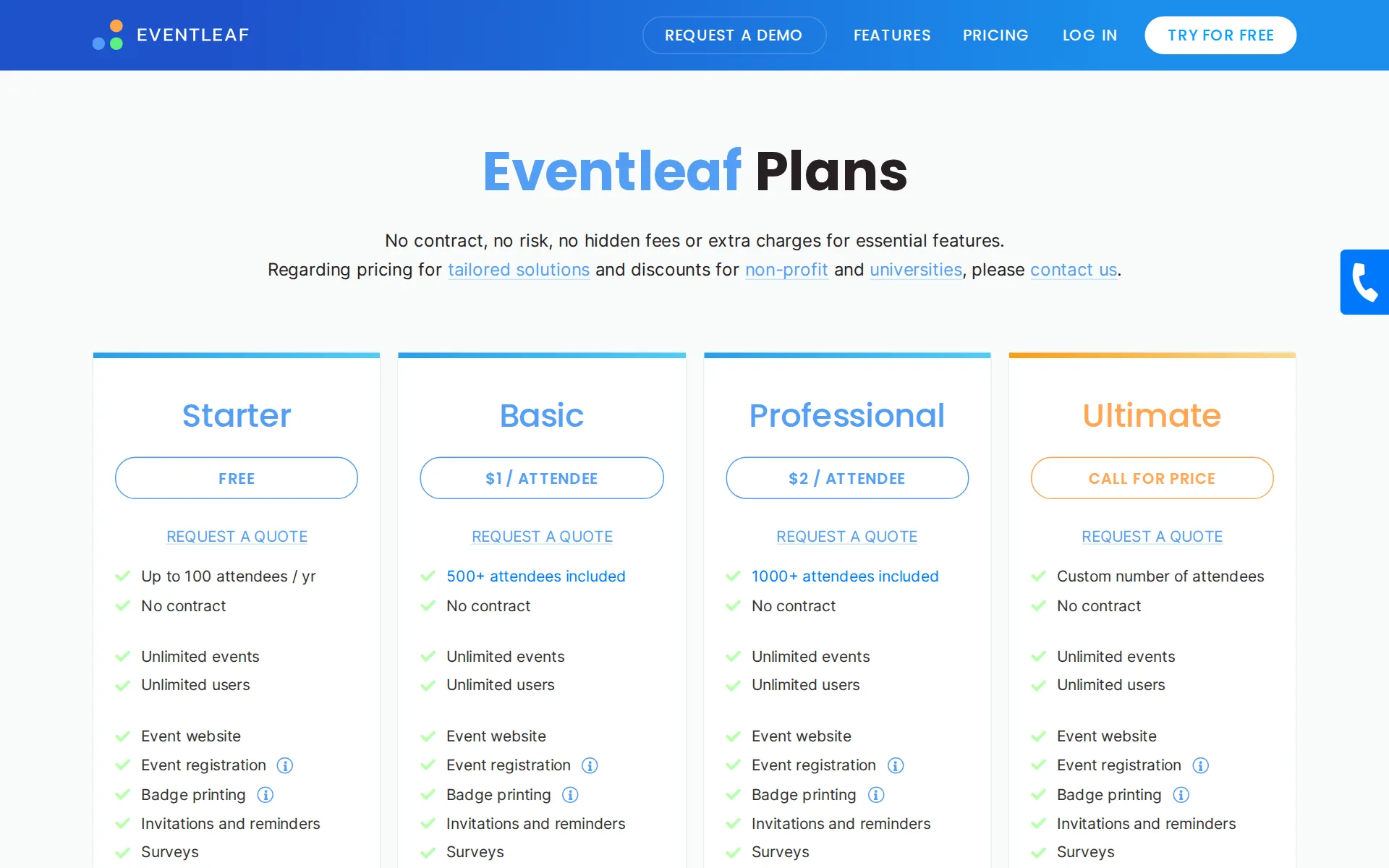
Pricing page, captured
What we checked on Eventleaf
Fees on 200 tickets at $25
$300 in fees on 200 tickets at $25 on Starter, all paid by the organizer: each ticket costs the buyer $25 and the organizer keeps $4,700. The vendor also states: “3% of the total transaction amount, when the organizer connects its own PayPal, Authorize.Net or Stripe account (that processor's own rate then applies on top)”.
On the page: Registration Sales section, Eventleaf Credit Card Processor slider at 'No minimum. Pay-as-you-go.'
Fees on 50 tickets at $25
$75 in fees on 50 tickets at $25 on Starter, all paid by the organizer: each ticket costs the buyer $25 and the organizer keeps $1,175. The vendor also states: “3% of the total transaction amount, when the organizer connects its own PayPal, Authorize.Net or Stripe account (that processor's own rate then applies on top)”.
On the page: Registration Sales section, Eventleaf Credit Card Processor slider at 'No minimum. Pay-as-you-go.'
The fee per ticket
The fee is a straight percentage of the transaction with no fixed per-ticket amount and no published cap: 3% when you connect your own processor, 6% when Eventleaf processes the card.
Organizer will pay a Transaction Fee of up to 6% (six percent) of the total transaction amount for the purchase of Event tickets.
Who pays the fees
The organizer pays the fee out of the ticket price; Eventleaf states it charges buyers nothing, so there is no option to add the fee to the buyer's price.
JOLLY will not charge or impose any service fees on the purchaser of tickets.
Card processing
You choose: Eventleaf's own processor at an all-in 6% with no merchant account, or your own PayPal, Authorize.Net or Stripe account at 3% to Eventleaf plus whatever your processor charges.
If Organizer chooses to use its own payment processor, Organizer is responsible for all fees and expenses charged by its merchant bank. JOLLY…
All-in price at checkout
Buyers are charged the registration price the organizer sets, with no platform service fee added anywhere in checkout, because the fee is billed to the organizer instead.
JOLLY will not charge or impose on the Purchaser any service fees for the purchase of Event tickets.
Free events
The Starter plan carries no cost for up to 100 attendees a year, and the transaction fee applies only to ticket sales, but larger free events need a paid per-attendee plan.
Up to 100 attendees / yr
Fees on refunds
Eventleaf keeps its transaction fee when a registration is refunded, and the fee is taken out of the organizer's event account balance or billed to the card on file.
The Transaction Fee is non-refundable.
Nonprofit rates
Nonprofits are offered custom pricing and discounts, but no rate or percentage is published; you have to request a quote to learn what the discount is.
That's why Eventleaf offers exclusive custom pricing and substantial discounts tailored to your specific needs.
Plans and subscriptions
Plans are sold yearly by attendee count: Starter free to 100 attendees, Basic $1 per attendee from $500, Professional $2 per attendee from $2,000, Ultimate by quote. They unlock features, not lower ticket fees.
Select an initial attendee limit based on your needs. Only pay $1 per additional attendee if you exceed the initial limit.
Donations and tips
Donations can be collected online alongside tickets, and nonprofit pages describe pre-defined donation levels; nothing on these pages asks buyers to tip Eventleaf itself.
Sell tickets and accept online donations with ease. Use Eventleaf's built-in payment system or connect your PayPal, Stripe, or Authorize.net account.
Sales tax on tickets
no sales tax is collected or remitted by Eventleaf; its terms put the determination and payment of every ticket tax on the organizer, and no tax line feature is documented.
Organizer is solely responsible for the determination and payment of any city, municipal, county, state, and federal taxes, including sales, use,…
When you get the money
With your own processor the money lands immediately; with Eventleaf's processor you are paid by ACH on the 5th of each month, and payment can be withheld up to 60 days after the event.
On the 5th day of each month (or the next business day if it falls on a weekend or holiday), JOLLY will pay to Organizer the revenues collected from…
Disputed charges
On Eventleaf's processor the organizer bears a disputed charge and pays $30 per transaction, deducted from the event account balance; with your own processor your bank's rules apply.
In the event of a credit card chargeback by a Purchaser, Organizer shall pay a chargeback fee of $30 USD per credit card transaction.
Your buyers’ details
Registrant details are yours to keep and reuse: contact lists can be imported and exported, attendees from a past event can be pulled in, and invitations are sent from the platform.
Whether you prefer to upload a CSV file or leverage attendees from a past event, we make it easy to bring your contacts together.
Ticket types and discounts
Tiered registration packages, conditional options, discount codes with usage limits and order minimums, presale codes and group registration are all documented.
Generate discount codes to offer discounted event registration fees. Discounts can be configured in many ways such as setting a maximum number of…
Questions at checkout
You design the attendee form with your own field types, and fields can be required, conditional or hidden, with different forms per registration type.
Design a custom form for capturing event attendee information. Add different field types such as drop-down menus, radio buttons, multi-select…
Registration forms and waivers
Custom registration forms are core to the product, and check-in agreements can be built into the check-in workflow as the document attendees sign on arrival.
Draft check-in agreements and incorporate them into your event's check-in workflow to improve information security and prevent unnecessary legal and…
Waitlist
A waitlist opens when capacity is reached, and the first person on it is notified and holds a reserved spot for a period you configure.
Allow attendees to add themselves to a waitlist when registration is full. If a space becomes available, the first person on the waitlist will be…
Online events
Virtual sessions are sold as registration options and the join link reaches buyers in the confirmation email, the event app and the attendee portal, using Zoom, Webex, GoToMeeting or YouTube.
Include list of virtual sessions an attendee has signed up for in their confirmation email. Allow attendees to join virtual sessions by simply…
Sell on your own website
Eventleaf supplies code snippets for buttons, links and embedded registration forms on your site, but the same pages describe the snippets as directing visitors to the Eventleaf registration page.
Add buttons, links, or embedded registration forms to your nonprofit's website to boost visibility. Eventleaf generates ready-to-use code snippets to…
Website builders
embed only: the vendor publishes code snippets you paste into your site's HTML, and no WordPress, Squarespace, Wix or Shopify plugin or app is named anywhere on the pages read.
Eventleaf generates customized hyperlink or button code that seamlessly directs your visitors to your event landing or registration page. Simply…
Add-ons
Extras are sold as registration options alongside the ticket, including merchandise, meals, tours and accommodation, and they can be shown conditionally.
Accept payments for tours, accommodation, merchandise, and additional items.
Refunds and transfers by buyers
Attendees can modify or cancel their own registration and get an automatic refund up to a date you set, with a refund percentage or refund fee you choose; ticket transfer to a friend is not described.
Allow attendees to cancel their registration and receive an automatic refund, if applicable, until
Check-in app
The check-in app scans QR codes and works offline on iOS, Android and Windows, but the pricing table only lists the check-in app from the Professional plan upward.
Check in app ** Event check in * Session check in * Time tracking * CE / PDH credits * Attendance ceritificates * Entry control * Digital signature…
Door sales
The check-in app can take a card or record cash at the door, yet the terms say Eventleaf will not manage onsite payments, so the two pages disagree and no door fee is published.
Have attendees paying on-site? No problem! Collect credit card info for an attendee or record alternative means of payment if you allow checks or…
Email to buyers
Contact lists can be built from attendees of a past event, segmented into groups, and sent designed invitations and reminders on a schedule from inside the platform.
Segment your list into targeted groups and tailor multiple invitation designs for each audience.
Ad tracking
The event page can be linked to a Google Analytics account for page views and visitor data; a Meta pixel is not mentioned on the integrations page.
Link your Eventleaf event page with your Google Analytics account to view detailed web stats such as page views and user information.
Promoter links
You can hand partners unique links with tracking codes built in and report on registrations and ticket sales by referral source.
Generate unique links with embedded tracking codes and distribute them to your partners. Track event registrations and ticket sales by referral…
Works with
Salesforce, HubSpot, Marketo and Zapier are all supported, but the pricing table places those integrations on the quote-priced Ultimate plan, with Zapier among its add-ons.
Single Sign On (SSO) - HubSpot integration - Lobbytrack integration - Marketo integration - Salesforce integration
API
An API for registrations, contacts, financial data and orders is documented, but the pricing table lists API access among the add-ons on the quote-priced Ultimate plan.
add ons - Priority support - 24/7 - On-site event support - API access - Zapier access - Tailored solutions
Free to start
Selling tickets always costs the organizer a percentage of the sale, since Eventleaf bills the transaction fee to the organizer and never to the buyer.
JOLLY will charge Organizer a service fee for any tickets for an Event sold on the Site (the "Transaction Fee").
Sign up without a sales call
You can sign up and build an event yourself without talking to sales, and the vendor states no credit card is needed to start; only the Ultimate plan is quote-priced.
Get Started for Free No credit card required.
eventleaf.comChecked
Contract
Every published plan is sold without a contract and the vendor describes the model as pay-as-you-go, so there is no term or exclusivity to leave between events.
No contract, no risk, no hidden fees or extra charges for essential features.
Support on event day
Email support comes with the free Starter plan and phone support from Basic upward, but 24/7 priority and on-site support are Ultimate add-ons and no support hours are published.
Email and phone support
Eventleaf alternatives
All 9 alternatives6 more alternatives
8 of the 9 publish a price.
- RSVPifyFree, then $0.90 per ticketRegistration, ticketing, guest management, seating, and QR-code check-in in one platform.
- EventbriteFree, then $69 a monthTicketing platform with a buyer-discovery marketplace and optional fee transfer.
- RunSignupFreeFree endurance-event registration platform billed only through per-transaction processing fees.
- GivebutterFree, then $33.80 a monthFree nonprofit fundraising platform with event ticketing, auctions and a built-in donor CRM.


Sources and changes
Last changed
Sources on eventleaf.com12
- /event-management-platform/pricing
- /legal/terms-of-service
- /event-management/register-online
- /event-management/send-invitations
- /event-management-platform/online-fundraising-event-registration
- /event-management/check-in-app-features
- /event-management/collect-payments
- /
- /event-management-platform/non-profit-event-management-platform
- /event-management/integrate-app
- /event-management/virtual-event-platform
- /how-to/how-to-define-cancellation-and-refund-policies-in-eventleaf
Is this yours?
Run this platform? Claim the page for free, see its visitors and add the owner mark. You confirm it with an email at eventleaf.com.
Report an error if a fact is wrong.