
Eventeny price and terms
Terms
- Free plan
- YesYesBasic plan is $0/mo with unlimited events, tickets and purchases, 1 admin seat and a 3% ticket fee (5% on applications)
The terms in full
a credit card must be kept on file but is not charged.
- Sign up without sales
- YesYes
What needs a higher plan
- Pro
- Reserved seating, Ad tracking, Works with, API
- Plus
- Sell on your own website, Door sales, Email to buyers
For AI agents
- API
- PartlyPro
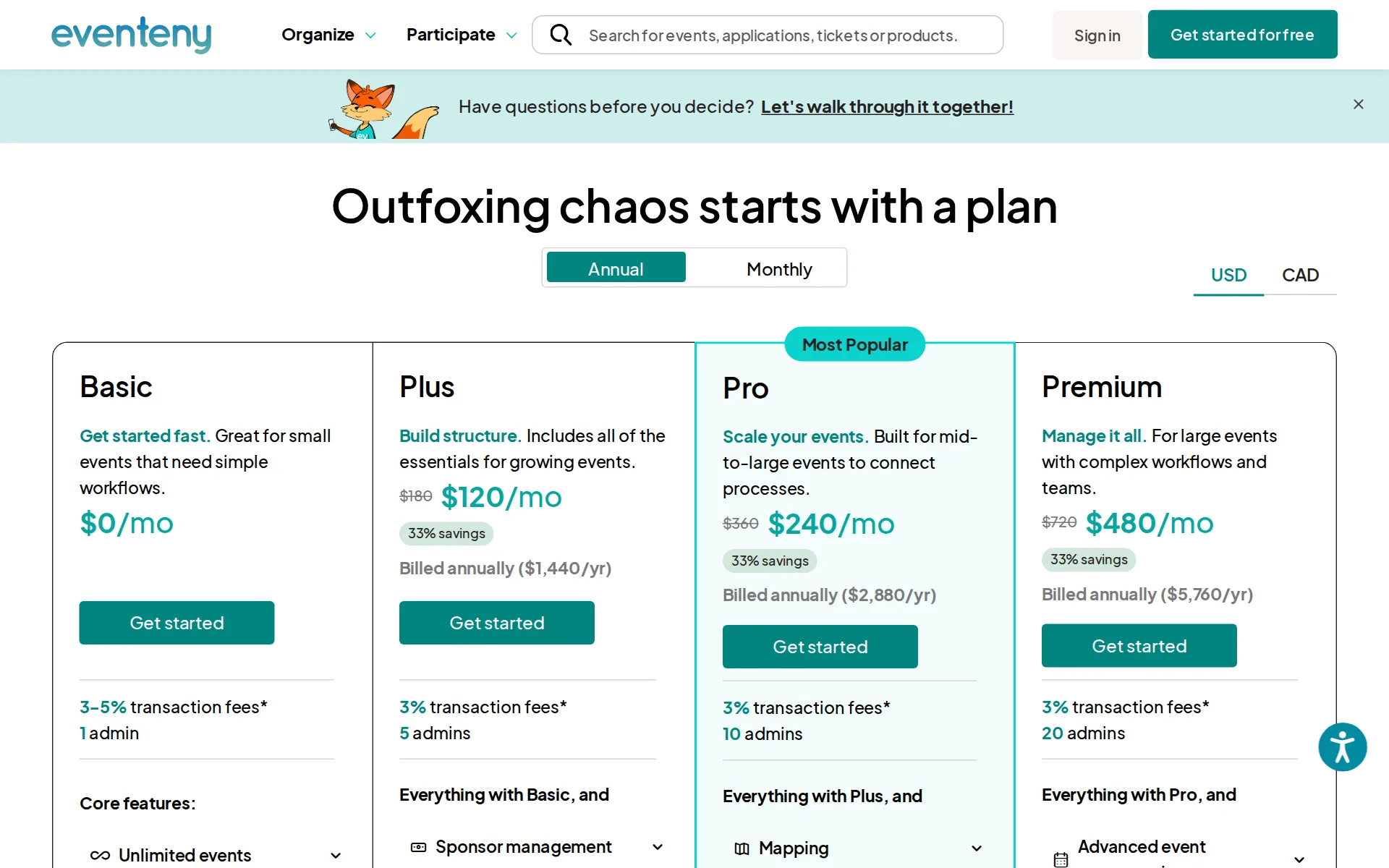
Pricing page, captured
eventeny.com/product/pricing, checked
What we checked on Eventeny
The fee per ticket
Eventeny charges a flat 3% platform fee on every paid ticket on all plans, with no per-ticket minimum or cap published for ticketing.
Standard credit card and ACH fees not included. Ticket & fundraising transaction fees are at 3% for all plans.
eventeny.com/product/pricingChecked
Who pays the fees
The organizer chooses per ticket whether buyers pay the fees, the organizer absorbs them, or the two split them; passing to buyers is the default.
By default, fees are set to pass fees to the event participants. However, when creating your tickets, pricing your applications, or issuing an…
Card processing
Cards are processed by Stripe through the organizer's connected Stripe account, and that cost sits on top of Eventeny's 3% rather than inside it.
Plus, Pro, and Premium plans include a standard 3% platform fee, plus Stripe's 2.99% + $0.10 credit card processing fee.
eventeny.com/product/pricingChecked
All-in price at checkout
Ticket pages now lead with the fee-inclusive total and keep a breakdown below it; Eventeny built this for the Massachusetts junk-fee law but applies it to all ticket pages.
Instead of showing only the base ticket price (e.g., “$117 + fees”), buyers will now immediately see the final price including fees (e.g., “$124…
Free events
Free tickets and free applications carry no platform or processing fee at all, for either the organizer or the attendee.
If your ticket or application is free, you or your event participants will not pay any additional fees.
Fees on refunds
Fees go back to whoever originally paid them on a refund, but only when the organizer has connected a regular Stripe account; check payouts and Stripe Express are excluded.
Fees can only be refunded for transactions if you have connected a regular Stripe account. Transactions processed via check/manual payout or a Stripe…
Plans and subscriptions
Paid monthly or annual plans are sold, and they cut the application fee from 5% to 3% while the ticket fee stays at 3% on every plan.
Basic (free) accounts have a 5% platform fee on applications, while ticketing and fundraising remain at a 3% platform fee.
eventeny.com/product/pricingChecked
Donations and tips
Fundraising goals take standalone contributions with custom amounts and tiers at the 3% fundraising fee; no platform tip is requested of buyers at checkout.
Ticket & fundraising transaction fees are at 3% for all plans.
eventeny.com/product/pricingChecked
Refund protection at checkout
offered, off by default — evProtect from Protect Group is enabled by the organizer, shown only on non-refundable tickets, and paid by the attendee as an extra fee at checkout.
Not all event organizers offer EvProtect to their attendees. If your event organizer provides this option, you'll see it during the ticket checkout…
Sales tax on tickets
adds a tax line — the organizer sets a sales tax rate per ticket, Eventeny collects it as a separate checkout line and pays it out, but never remits it.
Taxes are collected from buyers at checkout as a separate line item on each order. ... As the event organizer, you are responsible for remitting the…
When you get the money
With Stripe connected the organizer is paid out daily as tickets sell at no extra cost; organizers taking check payouts instead wait months and pay 1% capped at $5.
With automatic payouts, you will receive ACH payouts daily, unless you configure it differently. Eventeny and Stripe do not retain the funds of event…
Disputed charges
Eventeny files the dispute evidence for the organizer, but if the bank sides with the buyer the organizer loses the money and owes the Stripe and bank dispute fees, which are not published.
you will be responsible for the dispute fees imposed by Stripe and the bank, which we will invoice to you.
Your buyers’ details
Name and email are collected on every ticket and the organizer can export the buyer list and send group messages to ticket holders from the platform.
Two default questions, Name and Email, are automatically included and required for every ticket
Ticket types and discounts
Multiple ticket types, tiered and early-bird pricing, group passes, promo codes and flash sales are all supported on the ticketing product.
Eventeny lets you create various ticket types, including general admission, VIP, early bird, and group passes. You can also set up promo codes, flash…
eventeny.com/ticketingChecked
Reserved seating
Buyers can pick seats on a seat map at checkout, but ticketed seating charts are listed as part of the mapping module that starts on the Pro plan.
On the page: Pro plan card, Mapping feature list
eventeny.com/product/pricingChecked
Questions at checkout
Organizers add their own required or optional questions with conditional follow-ups, and choose whether answers are collected per order or per ticket.
Order level: Attendee information is asked once per order, regardless of how many tickets are included. Ticket level: Attendee information is asked…
Registration forms and waivers
Registration forms take custom fields and file uploads, and a signature question type lets attendees sign that they accept the stated policies.
utilize a signature custom question that requires users to sign their name stating that they understand refund policies.
Timed entry
Time slots or date-based tickets can be created with a quantity per slot so arrival times and capacity are controlled at checkout.
Set timeslots, capacity limits, and ticket availability to keep attendance organized and prevent overselling.
eventeny.com/ticketingChecked
Sell on your own website
Ticket widgets can be embedded so buyers check out on the organizer's own site, but website embedding is listed as a Plus-plan feature rather than a Basic one.
Administrative * Tags & office notes * Website embedding * Ticket mailing
eventeny.com/product/pricingChecked
Website builders
embed only — Eventeny supplies an HTML embed code the organizer pastes into Wix, Squarespace or WordPress; no dedicated plugin or app is offered.
you’ll need access to your website’s HTML/code editor, as we provide an embed code that must be pasted directly into your site.
Add-ons
Add-ons such as t-shirts or swag can be attached to tickets, and merchandise is sold through the product marketplace with redeemable deliverables.
Create add-ons like t-shirts, or swag for attendees to pick up with tickets.
eventeny.com/ticketingChecked
Recurring events
Recurring event series are supported on every plan, with multiple dates per event and copy-and-paste duplication year over year.
Unlimited events * Single & multi-day events * Recurring event series * Easy copy & paste year-over-year
eventeny.com/product/pricingChecked
Refunds and transfers by buyers
When the organizer enables it, buyers resell or switch their own tickets from their profile, receiving 94% of the price back once a resale sells.
Please note that you cannot resell tickets at a higher price than what you paid for them, and due to taxes and fees, you will only receive 94% of the…
Check-in app
The organizer mobile app scans QR codes for check-in on the free Basic plan and includes an offline mode for venues without connectivity.
Basic organizer mobile app * Rapid scan-and-go check-in * Bulk check-in for groups * Offline mode check-in
eventeny.com/product/pricingChecked
Door sales
Door sales by terminal, manual card entry, cash or comp run through the app, but the integrated POS and payment terminals are listed from the Plus plan upward.
Advanced organizer mobile app * Kiosk mode for self-serve purchasing * Sell products onsite with an integrated POS system * Issue tickets and collect…
eventeny.com/product/pricingChecked
Apple Wallet
Tickets can be added to Apple Wallet, and the organizer can brand the pass with its own logo, hero image and colors.
Clicking this option lets you customize how your ticket appears when added to a Google or Apple Wallet.
Google Wallet
Google Wallet passes are supported alongside Apple, with a live preview of the attendee name, seat and check-in QR code.
a live preview on the right shows how the ticket will appear in both Google and Apple Wallet, including the attendee name, confirmation number, seat,…
Listed where buyers browse
Published events are listed and ranked on Eventeny's own homepage and all-events search, and the published fee schedule charges no extra commission for those sales.
It directly influences how high your event ranks in search results, both on the homepage and in time/location-based searches on the all events page.
Email to buyers
Group messaging reaches past ticket holders by Eventeny inbox plus an email notification, but the feature starts on the Plus plan and is not a campaign builder.
This feature is available on the Plus, Pro and Premium plans.
Ad tracking
Facebook Pixel and Google Tag Manager can be connected to track ticket conversions, but the pricing page lists that integration from the Pro plan.
Facebook pixel & Google Tag Manager integration
eventeny.com/product/pricingChecked
Promoter links
The Affiliate Program issues each promoter a coded ticket link and reports their order count and value back to the organizer.
The Affiliate Program lets you give partners, influencers, or promoters their own ticket link so you can see exactly how many tickets they help you…
Works with
Zapier reaches thousands of apps but only on Pro and Premium and only for volunteer data; Stripe and BILL.com are the other named connections, with no Mailchimp or accounting integration documented.
At this time, Eventeny’s Zapier integration currently ONLY supports Volunteer-related data and actions.
API
A keyed REST API exports ticket orders and attendee allocations, but it is restricted to the Pro and Premium plans and its full reference sits behind a login.
This feature is available on the Pro and Premium plans.To upgrade your plan, reach out to customer support.
Free to start
The Basic plan costs nothing per month and fees default to the buyer, so an organizer can sell paid tickets without paying Eventeny itself.
Basic Get started fast. Great for small events that need simple workflows. $0/mo
eventeny.com/product/pricingChecked
Sign up without a sales call
Sign-up is self-serve from the pricing page with no sales call, though a credit card must be on file even for the free Basic account.
Yes. A credit card is required to create an Eventeny account. ... For Basic accounts, a card is required to be kept on file but will not be charged.
eventeny.com/product/pricingChecked
Contract
No contract or exclusivity is required, monthly plans are commitment-free, and multi-year contracts are optional discounts only.
No. Eventeny does not require a long-term contract. Monthly plans are completely commitment-free, and annual plans are also contract-free with a 33%…
eventeny.com/product/pricingChecked
Support on event day
Email support at support@eventeny.com handles organizers and their buyers, with a dedicated onboarding session and priority access on paid plans; no phone line or support hours are published.
please direct them to reach out to Eventeny Customer Support at support@eventeny.com.
Eventeny alternatives
All 9 alternatives6 more alternatives
All 9 publish a price.
- Ticket TailorFree, then about $0.80 per ticketFlat per-ticket fee ticketing paid into your own Stripe, PayPal or Square account.
- HumanitixFree, then $1.29 per paid ticketNonprofit ticketing: 5% + $1.29 a paid ticket, card processing included, profits to charity.
- RunSignupFreeFree endurance-event registration platform billed only through per-transaction processing fees.
- RSVPifyFree, then $0.90 per ticketRegistration, ticketing, guest management, seating, and QR-code check-in in one platform.


Sources and changes
Last changed
Sources18
- eventeny.com/product/pricing
- help.eventeny.com/en/articles/14743975-eventeny-s-fees-explained
- help.eventeny.com/en/articles/14743878-creating-tickets
- eventeny.com/ticketing
- help.eventeny.com/en/articles/14743972-dispute-process-overview
- help.eventeny.com/en/articles/14743752-ticket-selling-settings
- help.eventeny.com/en/articles/14743758-send-group-messages
- help.eventeny.com/en/articles/14743766-eventeny-event-score-guide
- help.eventeny.com/en/articles/14743768-embed-eventeny-features-on-your-website
- help.eventeny.com/en/articles/14743827-integrate-eventeny-with-zapier
- help.eventeny.com/en/articles/14743852-what-do-i-do-if-my-vendor-or-ticket-buyer-is-having-technical-issues-on-eventeny
- help.eventeny.com/en/articles/14743864-massachusetts-junk-fee-law-eventeny-compliance
- help.eventeny.com/en/articles/14743945-purchase-evprotect
- help.eventeny.com/en/articles/14743955-resell-your-ticket-s
- help.eventeny.com/en/articles/14743979-payout-timelines
- help.eventeny.com/en/articles/15888648-how-are-taxes-handled-for-ticket-sales-on-eventeny-and-what-are-organizers-responsibilities
- help.eventeny.com/en/articles/17312027-create-an-affiliate-link
- help.eventeny.com/en/articles/17734641-export-ticket-data-with-the-eventeny-api
Is this yours?
Run this platform? Claim the page for free, see its visitors and add the owner mark. You confirm it with an email at eventeny.com.
Report an error if a fact is wrong.